> ## Documentation Index
> Fetch the complete documentation index at: https://flatfile.com/docs/llms.txt
> Use this file to discover all available pages before exploring further.
# Namespaces and Filters
> Isolate and organize your Flatfile Listeners using namespace filtering and advanced Event filtering patterns
Flatfile provides two complementary approaches for organizing and scoping your Event handling: **namespaces** and **Event filters**. Together, they enable sophisticated Event routing, better code organization, and precise control over which [Listeners](/core-concepts/listeners) respond to specific Events.
*Organize and isolate different parts of your application at the App, Space, and Workbook level.*
*Target specific Sheets or event properties to create precise Event handling rules for your Listeners.*
Both approaches help organize and scope Event handling, reduce noise by ensuring Listeners only respond to relevant Events, and can be combined for the most flexible and maintainable Event organization.
## Namespaces
### Understanding Namespaces
Namespaces are simple string identifiers that you can assign to [Apps](/core-concepts/apps), [Spaces](/core-concepts/spaces), and [Workbooks](/core-concepts/workbooks) to organize and isolate different parts of your Flatfile application. When you assign a namespace to a resource, Events from that resource can be filtered using Listener namespace patterns.
#### How Namespace Filtering Works
Listeners use prefix patterns to filter Events based on the namespace of the resource that generated the Event:
* `space:namespace` - Listen to Events from [Spaces](/core-concepts/spaces) with the given namespace or belonging to [Apps](/core-concepts/apps) with that namespace
* `workbook:namespace` - Listen to Events from [Workbooks](/core-concepts/workbooks) with the given namespace
### App Namespaces
The most common namespace pattern is creating separate [Apps](/core-concepts/apps) with distinct namespaces, then using namespaced Listeners to handle different configurations for each app.
#### Setting App Namespaces
Namespaces are set when creating an App via the [Flatfile Dashboard](https://platform.flatfile.com/dashboard):
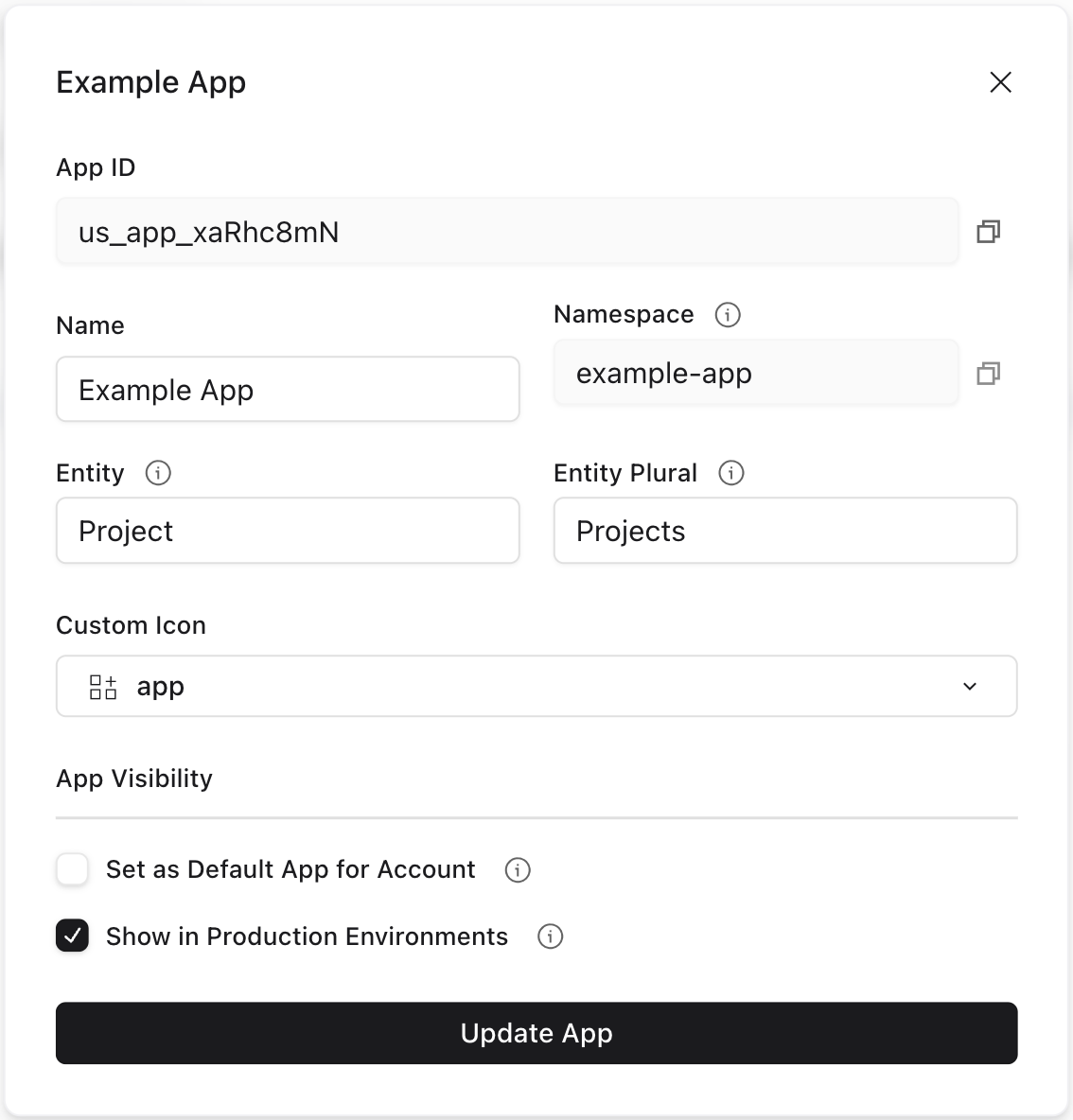 Let's walk through an example of routing events to different Listeners based on the App namespace.
Imagine creating three separate Apps with distinct namespaces:
**App Name:** Customer Portal\
**Namespace:** `customer-portal`\
**Purpose:** External customer data import
**App Name:** Internal Tools\
**Namespace:** `internal-tools`\
**Purpose:** Admin and operations
**App Name:** Partner Integration\
**Namespace:** `partner-integration`\
**Purpose:** B2B data exchange
#### Listening to App Namespace Events
Now you can use `listener.namespace()` to create separate Listeners for Spaces within each App. This will provide a new, filtered Listener object scoped to your callback function.
This pattern allows each App to have completely different:
* Space configurations and blueprints
* Data validation rules
* Processing workflows
* User experiences
* Integration behaviors
```javascript JavaScript theme={null}
export default function (listener) {
// Customer Portal - External customer data import
listener.namespace('space:customer-portal', (customerListener) => {
customerListener.use(configureCustomerPortalSpace);
customerListener.use(configureGuidedSetup);
customerListener.use(validateCustomerData);
});
// Internal Tools - Admin and operations
listener.namespace('space:internal-tools', (internalListener) => {
internalListener.use(configureInternalToolsSpace);
internalListener.use(validateAdvancedRules);
internalListener.use(applyBusinessLogic);
});
// Partner Integration - B2B data exchange
listener.namespace('space:partner-integration', (partnerListener) => {
partnerListener.use(configurePartnerIntegrationSpace);
partnerListener.use(processAutomatically);
partnerListener.use(syncPartnerData);
});
}
```
```typescript TypeScript theme={null}
import { FlatfileListener } from '@flatfile/listener';
export default function (listener: FlatfileListener) {
// Customer Portal - External customer data import
listener.namespace('space:customer-portal', (customerListener: FlatfileListener) => {
customerListener.use(configureCustomerPortalSpace);
customerListener.use(configureGuidedSetup);
customerListener.use(validateCustomerData);
});
// Internal Tools - Admin and operations
listener.namespace('space:internal-tools', (internalListener: FlatfileListener) => {
internalListener.use(configureInternalToolsSpace);
internalListener.use(validateAdvancedRules);
internalListener.use(applyBusinessLogic);
});
// Partner Integration - B2B data exchange
listener.namespace('space:partner-integration', (partnerListener: FlatfileListener) => {
partnerListener.use(configurePartnerIntegrationSpace);
partnerListener.use(processAutomatically);
partnerListener.use(syncPartnerData);
});
}
```
For more information on Events and Listeners (including `listener.use()`, as in this example), see [Events and Listeners](/core-concepts/listeners).
### Space Namespaces
Beyond App-level namespacing, you can also apply namespaces directly to individual Spaces, enabling unique configurations and behaviors on a space-by-space basis.
**Important**: [Spaces](/core-concepts/spaces) inherit their [App's](/core-concepts/apps) namespace by default. When you create [listeners](/core-concepts/listeners) that filter on `space:app-namespace`, they receive Events from spaces within that App.
If you override a Space's namespace to be different from its App, Listeners filtering on the App's namespace will no longer receive Events from that Space. For example:
1. App has namespace `"my-app"`
2. You create a Space with explicit namespace `"my-space"`
3. Listeners filtering on `space:my-space` *will* receive Events from that Space
4. Listeners filtering on `space:my-app` *will not* receive Events from that Space
This applies regardless of whether the Space belongs to that App. Any other Spaces created without explicit namespaces will continue to inherit the App namespace normally.
#### Setting Space Namespaces
Assign a namespace when creating a Space via the API:
```javascript JavaScript theme={null}
const templateSpace = await api.spaces.create({
name: "Template Manager",
namespace: "templates", // Simple string identifier
// ...space configuration
});
```
```typescript TypeScript theme={null}
import { Flatfile } from '@flatfile/api';
const templateSpace = await api.spaces.create({
name: "Template Manager",
namespace: "templates", // Simple string identifier
// ...space configuration
});
```
You can also set the namespace during the `space:configure` [Job](/core-concepts/jobs) by updating the Space. This may be useful if you're creating Spaces from the [Flatfile Dashboard](https://platform.flatfile.com/dashboard), which doesn't support setting a namespace during creation.
This example shows how to set the namespace based on the Space name, allowing you to have multiple configurations in the same App:
In this example, we'll show the full [Job](/core-concepts/jobs) Listener lifecycle implementation, complete with `ack` to acknowledge the job, `update` to report progress, and `complete` or `fail` to finish the job.
However, for most implementations, we recommend using the [Space Configure](/plugins/space-configure) plugin. This plugin takes care of even more of the heavy lifting for you; not only does it handle the Job lifecycle, but it also takes care of all of the API calls necessary to configure the Space and create its Workbooks and documents.
```javascript JavaScript theme={null}
// Set namespace based on space name patterns
listener.on("job:ready", { job: "space:configure" }, async (event) => {
const { jobId, spaceId } = event.context;
try {
await api.jobs.ack(jobId, { info: "Configuring space with namespace" });
// Get Space details to determine namespace
const space = await api.spaces.get(spaceId);
// Route spaces to different namespaces based on naming conventions
let namespace;
if (space.data.name.toLowerCase().endsWith('portal')) {
namespace = 'customer-portal';
} else if (space.data.name.toLowerCase().endsWith('admin')) {
namespace = 'internal-tools';
} else if (space.data.name.toLowerCase().endsWith('partner')) {
namespace = 'partner-integration';
} else {
namespace = 'general'; // Default namespace
}
await api.spaces.update(spaceId, {
namespace: namespace,
});
// ...create workbooks, sheets, documents
await api.jobs.complete(jobId, {
outcome: { message: `Space configured with namespace: ${namespace}` }
});
} catch (error) {
console.error(error);
await api.jobs.fail(jobId, {
outcome: { message: `Configuration failed: ${error.message}` }
});
}
});
```
```typescript TypeScript theme={null}
import { FlatfileListener, FlatfileEvent } from '@flatfile/listener';
import { Flatfile } from '@flatfile/api';
// Set namespace based on space name patterns
listener.on("job:ready", { job: "space:configure" }, async (event: FlatfileEvent) => {
const { jobId, spaceId } = event.context;
try {
await api.jobs.ack(jobId, { info: "Configuring space with namespace" });
// Get Space details to determine namespace
const space = await api.spaces.get(spaceId);
// Route spaces to different namespaces based on naming conventions
let namespace: string;
if (space.data.name.toLowerCase().endsWith('portal')) {
namespace = 'customer-portal';
} else if (space.data.name.toLowerCase().endsWith('admin')) {
namespace = 'internal-tools';
} else if (space.data.name.toLowerCase().endsWith('partner')) {
namespace = 'partner-integration';
} else {
namespace = 'general'; // Default namespace
}
await api.spaces.update(spaceId, {
namespace: namespace,
});
// ...create workbooks, sheets, documents
await api.jobs.complete(jobId, {
outcome: { message: `Space configured with namespace: ${namespace}` }
});
} catch (error) {
console.error(error);
await api.jobs.fail(jobId, {
outcome: { message: `Configuration failed: ${error.message}` }
});
}
});
```
For complete Space configuration examples, see [Creating Spaces](/core-concepts/spaces#creating-spaces).
#### Listening to Space Namespace Events
Use `listener.namespace()` to filter Events from Spaces with specific namespaces. This will provide a new, filtered Listener object scoped to your callback function:
```javascript JavaScript theme={null}
// Listen to Events from customer portal Spaces
listener.namespace('space:customer-portal', (customerPortalListener) => {
customerPortalListener.use(applyCustomerBranding);
customerPortalListener.use(configureGuidedOnboarding);
});
// Listen to Events from internal tools Spaces
listener.namespace('space:internal-tools', (internalToolsListener) => {
internalToolsListener.use(validateAdminData);
internalToolsListener.use(enableAuditLogging);
});
// Listen to Events from partner integration Spaces
listener.namespace('space:partner-integration', (partnerIntegrationListener) => {
partnerIntegrationListener.use(configureApiWebhooks);
partnerIntegrationListener.use(enableBulkProcessing);
});
// Listen to Events from general Spaces (default)
listener.namespace('space:general', (generalSpaceListener) => {
generalSpaceListener.use(validateBasicData);
});
```
```typescript TypeScript theme={null}
import { FlatfileListener } from '@flatfile/listener';
// Listen to Events from customer portal Spaces
listener.namespace('space:customer-portal', (customerPortalListener: FlatfileListener) => {
customerPortalListener.use(applyCustomerBranding);
customerPortalListener.use(configureGuidedOnboarding);
});
// Listen to Events from internal tools Spaces
listener.namespace('space:internal-tools', (internalToolsListener: FlatfileListener) => {
internalToolsListener.use(validateAdminData);
internalToolsListener.use(enableAuditLogging);
});
// Listen to Events from partner integration Spaces
listener.namespace('space:partner-integration', (partnerIntegrationListener: FlatfileListener) => {
partnerIntegrationListener.use(configureApiWebhooks);
partnerIntegrationListener.use(enableBulkProcessing);
});
// Listen to Events from general Spaces (default)
listener.namespace('space:general', (generalSpaceListener: FlatfileListener) => {
generalSpaceListener.use(validateBasicData);
});
```
### Workbook Namespaces
[Workbooks](/core-concepts/workbooks) can also have namespaces for more granular Event filtering within the same [Space](/core-concepts/spaces). This can be set directly in the Workbook's [Blueprint](/core-concepts/blueprints).
This example configures a structure with two Workbooks in the same Space, with a flow for moving data from the staging Workbook to the production Workbook.
#### Setting Workbook Namespaces
```javascript JavaScript theme={null}
const workbook = {
name: 'Employee Data Processing',
namespace: 'staging', // Simple string namespace
sheets: [employeesSheet, departmentsSheet, payrollSheet]
};
```
```typescript TypeScript theme={null}
import { Workbook } from '@flatfile/api';
const workbook: Workbook = {
name: 'Employee Data Processing',
namespace: 'staging', // Simple string namespace
sheets: [employeesSheet, departmentsSheet, payrollSheet]
};
```
```javascript JavaScript theme={null}
const workbook = {
name: 'Employee Data Processing: ',
namespace: 'production', // Simple string namespace
sheets: [employeesSheet, departmentsSheet, payrollSheet]
};
```
```typescript TypeScript theme={null}
import { Workbook } from '@flatfile/api';
const workbook: Workbook = {
name: 'Employee Data Processing: ',
namespace: 'production', // Simple string namespace
sheets: [employeesSheet, departmentsSheet, payrollSheet]
};
```
#### Listening to Workbook Namespace Events
Events from Workbooks with namespaces are filtered using the `workbook:namespace` pattern.
```javascript JavaScript theme={null}
listener.use(configureAllWorkbooks);
listener.use(validateData);
// Listen to Events from Workbooks with "staging" namespace
listener.namespace('workbook:staging', (stagingWorkbookListener) => {
stagingWorkbookListener.use(migrateStagingDataToProduction);
});
// Listen to Events from Workbooks with "production" namespace
listener.namespace('workbook:production', (productionWorkbookListener) => {
productionWorkbookListener.use(applyBusinessLogic);
productionWorkbookListener.use(enableAuditing);
});
```
```typescript TypeScript theme={null}
import { FlatfileListener } from '@flatfile/listener';
listener.use(configureAllWorkbooks);
listener.use(validateData);
// Listen to Events from Workbooks with "staging" namespace
listener.namespace('workbook:staging', (stagingWorkbookListener: FlatfileListener) => {
stagingWorkbookListener.use(migrateStagingDataToProduction);
});
// Listen to Events from Workbooks with "production" namespace
listener.namespace('workbook:production', (productionWorkbookListener: FlatfileListener) => {
productionWorkbookListener.use(applyBusinessLogic);
productionWorkbookListener.use(enableAuditing);
});
```
### Listening to Multiple Namespaces
The `listener.namespace()` function can accept an array of namespace patterns as its first argument, allowing you to listen to Events from multiple namespaces with a single Listener configuration. This is useful when you want to apply the same processing logic across different namespaces.
You can also mix different namespace types in the same array. The Listener in this example will receive Events from both the `space:admin-tools` and `workbook:critical-data` namespaces:
```javascript JavaScript theme={null}
// Listen to events from specific Spaces and Workbooks
listener.namespace(['space:admin-tools', 'workbook:critical-data'], (adminCriticalListener) => {
adminCriticalListener.use(enableHighSecurityMode);
adminCriticalListener.use(requireApproval);
adminCriticalListener.use(flagForReview);
});
```
```typescript TypeScript theme={null}
import { FlatfileListener } from '@flatfile/listener';
// Listen to events from specific Spaces and Workbooks
listener.namespace(['space:admin-tools', 'workbook:critical-data'], (adminCriticalListener: FlatfileListener) => {
adminCriticalListener.use(enableHighSecurityMode);
adminCriticalListener.use(requireApproval);
adminCriticalListener.use(flagForReview);
});
```
### Nested Namespace Example
You can also nest namespacing: let's say you have two Apps (`customer-portal` and `vendor-portal`), and each App processes data through different Workbook types (`invoices` and `orders`). You want to ensure that each App's Workbooks are completely isolated from the other App, but within each App you want specific handling for each Workbook type.
This example demonstrates how App, Space, and Workbook namespaces work together with nested Listeners:
#### Setting Up Multiple Apps
First, create two Apps via the [Flatfile Dashboard](https://platform.flatfile.com/dashboard), each with distinct namespaces:
**App Name:** Customer Portal\
**Namespace:** `customer-portal`\
**Purpose:** External customer data import and processing
**App Name:** Vendor Portal\
**Namespace:** `vendor-portal`\
**Purpose:** B2B vendor data exchange and management
#### Nested Listener Configuration
To help reduce scrolling for this example, we've split it into two tabs: **Blueprints** and **Listener Configuration**.
Each App requires different field structures for their invoice and order processing, so we define App-specific Blueprint configurations. See the next tab for the Listener Configuration.
```javascript JavaScript theme={null}
// Customer Portal Blueprint configurations
const customerInvoiceWorkbook = {
name: "Customer Invoice Processing",
namespace: "invoices",
sheets: [{
name: "Customer Invoices",
slug: "invoices",
fields: [
{ key: "invoice_number", type: "string", label: "Invoice Number" },
{ key: "customer_name", type: "string", label: "Customer Name" },
{ key: "billing_amount", type: "number", label: "Billing Amount" }
]
}]
};
const customerOrderWorkbook = {
name: "Customer Order Processing",
namespace: "orders",
sheets: [{
name: "Customer Orders",
slug: "orders",
fields: [
{ key: "order_id", type: "string", label: "Order ID" },
{ key: "customer_name", type: "string", label: "Customer Name" },
{ key: "order_total", type: "number", label: "Order Total" }
]
}]
};
// Vendor Portal Blueprint configurations
const vendorInvoiceWorkbook = {
name: "Vendor Invoice Processing",
namespace: "invoices",
sheets: [{
name: "Vendor Invoices",
slug: "invoices",
fields: [
{ key: "vendor_invoice_id", type: "string", label: "Vendor Invoice ID" },
{ key: "vendor_company", type: "string", label: "Vendor Company" },
{ key: "payment_due", type: "number", label: "Payment Due" }
]
}]
};
const vendorOrderWorkbook = {
name: "Vendor Purchase Orders",
namespace: "orders",
sheets: [{
name: "Purchase Orders",
slug: "orders",
fields: [
{ key: "po_number", type: "string", label: "PO Number" },
{ key: "supplier_name", type: "string", label: "Supplier Name" },
{ key: "purchase_amount", type: "number", label: "Purchase Amount" }
]
}]
};
```
```typescript TypeScript theme={null}
import { Flatfile } from '@flatfile/api';
// Customer Portal Blueprint configurations
const customerInvoiceWorkbook: Flatfile.CreateWorkbookConfig = {
name: "Customer Invoice Processing",
namespace: "invoices",
sheets: [{
name: "Customer Invoices",
slug: "invoices",
fields: [
{ key: "invoice_number", type: "string", label: "Invoice Number" },
{ key: "customer_name", type: "string", label: "Customer Name" },
{ key: "billing_amount", type: "number", label: "Billing Amount" }
]
}]
};
const customerOrderWorkbook: Flatfile.CreateWorkbookConfig = {
name: "Customer Order Processing",
namespace: "orders",
sheets: [{
name: "Customer Orders",
slug: "orders",
fields: [
{ key: "order_id", type: "string", label: "Order ID" },
{ key: "customer_name", type: "string", label: "Customer Name" },
{ key: "order_total", type: "number", label: "Order Total" }
]
}]
};
// Vendor Portal Blueprint configurations
const vendorInvoiceWorkbook: Flatfile.CreateWorkbookConfig = {
name: "Vendor Invoice Processing",
namespace: "invoices",
sheets: [{
name: "Vendor Invoices",
slug: "invoices",
fields: [
{ key: "vendor_invoice_id", type: "string", label: "Vendor Invoice ID" },
{ key: "vendor_company", type: "string", label: "Vendor Company" },
{ key: "payment_due", type: "number", label: "Payment Due" }
]
}]
};
const vendorOrderWorkbook: Flatfile.CreateWorkbookConfig = {
name: "Vendor Purchase Orders",
namespace: "orders",
sheets: [{
name: "Purchase Orders",
slug: "orders",
fields: [
{ key: "po_number", type: "string", label: "PO Number" },
{ key: "supplier_name", type: "string", label: "Supplier Name" },
{ key: "purchase_amount", type: "number", label: "Purchase Amount" }
]
}]
};
```
Unlike other examples, this one uses the [Space Configure](/plugins/space-configure) plugin to configure the Space. The alternative – Space configuration using the full Job Lifecycle management approach – is more instructive, but significantly more verbose. See the [Space Configuration](/core-concepts/spaces#space-configuration) section for examples of that.
The Space Configure plugin takes a lot of heavy lifting off your hands; not only does it handle the Job lifecycle, but it also takes care of all of the API calls necessary to configure the Space and create its Workbooks and documents.
With this plugin, you can configure your entire space with a single configuration object rather than perforing any API calls.
```javascript JavaScript theme={null}
import { configureSpace } from '@flatfile/plugin-space-configure';
export default function (listener) {
// Namespaced for the Customer Portal App
listener.namespace("space:customer-portal", (customerListener) => {
// Configure Space using the plugin
customerListener.use(configureSpace({
workbooks: [customerInvoiceWorkbook, customerOrderWorkbook]
}));
// Handle Events from Invoice Workbooks in the Customer Portal App
customerListener.namespace("workbook:invoices", (customerInvoiceListener) => {
customerInvoiceListener.use(validateCustomerInvoiceData);
});
// Handle Events from Order Workbooks in the Customer Portal App
customerListener.namespace("workbook:orders", (customerOrderListener) => {
customerOrderListener.use(validateCustomerOrderData);
});
});
// Namespaced for the Vendor Portal App
listener.namespace("space:vendor-portal", (vendorListener) => {
// Configure Space using the plugin
vendorListener.use(configureSpace({
workbooks: [vendorInvoiceWorkbook, vendorOrderWorkbook]
}));
// Handle Events from Invoice Workbooks in the Vendor Portal App
vendorListener.namespace("workbook:invoices", (vendorInvoiceListener) => {
vendorInvoiceListener.use(validateVendorInvoices);
});
// Handle Events from Order Workbooks in the Vendor Portal App
vendorListener.namespace("workbook:orders", (vendorOrderListener) => {
vendorOrderListener.use(validateVendorOrders);
});
});
}
```
```typescript TypeScript theme={null}
import { FlatfileListener } from '@flatfile/listener';
import { Flatfile } from '@flatfile/api';
import { configureSpace } from '@flatfile/plugin-space-configure';
export default function (listener: FlatfileListener) {
// Namespaced for the Customer Portal App
listener.namespace("space:customer-portal", (customerListener: FlatfileListener) => {
// Configure Space using the plugin
customerListener.use(configureSpace({
workbooks: [customerInvoiceWorkbook, customerOrderWorkbook]
}));
// Handle Events from Invoice Workbooks in the Customer Portal App
customerListener.namespace("workbook:invoices", (customerInvoiceListener: FlatfileListener) => {
customerInvoiceListener.use(validateCustomerInvoiceData);
});
// Handle Events from Order Workbooks in the Customer Portal App
customerListener.namespace("workbook:orders", (customerOrderListener: FlatfileListener) => {
customerOrderListener.use(validateCustomerOrderData);
});
});
// Namespaced for the Vendor Portal App
listener.namespace("space:vendor-portal", (vendorListener: FlatfileListener) => {
// Configure Space using the plugin
vendorListener.use(configureSpace({
workbooks: [vendorInvoiceWorkbook, vendorOrderWorkbook]
}));
// Handle Events from Invoice Workbooks in the Vendor Portal App
vendorListener.namespace("workbook:invoices", (vendorInvoiceListener: FlatfileListener) => {
vendorInvoiceListener.use(validateVendorInvoices);
});
// Handle Events from Order Workbooks in the Vendor Portal App
vendorListener.namespace("workbook:orders", (vendorOrderListener: FlatfileListener) => {
vendorOrderListener.use(validateVendorOrders);
});
});
}
```
## Event Filters
### Understanding Event Filtering
The `listener.filter()` method creates filtered Listener instances that only respond to Events matching specific criteria, returning a new `FlatfileListener` instance with the applied filter conditions.
### Basic Filtering
The most fundamental use of `listener.filter()` is to respond to specific Events based on simple criteria. This approach is useful when you want different processing logic for different types of Jobs or Events within the same namespace, without creating separate Event handlers for each case.
```javascript JavaScript theme={null}
// With callback function for multiple handlers
listener.filter({ sheet: 'contacts' }, (contactsListener) => {
contactsListener.on('commit:created', async (event) => {
console.log('Contact data committed');
// Process contact data validation
});
contactsListener.on('records:created', async (event) => {
console.log('New contacts added');
// Handle contact creation workflow
});
});
// Chaining `filter()` with `on()`
listener
.filter({ sheet: 'contacts' })
.on('records:updated', async (event) => {
console.log('Contact updated');
// Handle contact updates
});
```
```typescript TypeScript theme={null}
import { FlatfileListener, FlatfileEvent } from '@flatfile/listener';
// With callback function for multiple handlers
listener.filter({ sheet: 'contacts' }, (contactsListener: FlatfileListener) => {
contactsListener.on('commit:created', async (event: FlatfileEvent) => {
console.log('Contact data committed');
// Process contact data validation
});
contactsListener.on('records:created', async (event: FlatfileEvent) => {
console.log('New contacts added');
// Handle contact creation workflow
});
});
// Chaining `filter()` with `on()`
listener
.filter({ sheet: 'contacts' })
.on('records:updated', async (event: FlatfileEvent) => {
console.log('Contact updated');
// Handle contact updates
});
```
### Wildcard Filtering
Filters support wildcard patterns using `*` to match partial values. This may be useful when you want to filter by ID patterns or prefixes.
This example filters for `commit:created` events that were initiated by [Jobs](/core-concepts/jobs) rather than users. When a Job causes changes to your data (commits), the `actorId` in the event context will be the job ID (starting with `"us_jb"`):
```javascript JavaScript theme={null}
// Use wildcard to filter for events initiated by jobs (actorId starts with "us_jb")
listener
.filter({actorId: "us_jb*"}) // note the * wildcard
.on("commit:created", async (event) => {
// Get the job details that caused this commit
const { data: job } = await api.jobs.get(event.context.actorId);
console.log(`Job ${job.operation} caused a commit in sheet ${event.context.sheetId}`);
// ...React to job-initiated commits
});
```
```typescript TypeScript theme={null}
import { FlatfileListener, FlatfileEvent } from '@flatfile/listener';
// Use wildcard to filter for events initiated by jobs (actorId starts with "us_jb")
listener
.filter({actorId: "us_jb*"}) // note the * wildcard
.on("commit:created", async (event: FlatfileEvent) => {
// Get the job details that caused this commit
const { data: job } = await api.jobs.get(event.context.actorId);
console.log(`Job ${job.operation} caused a commit in sheet ${event.context.sheetId}`);
// ...React to job-initiated commits
});
```
### Chaining Filters and Namespaces
You can also chain multiple filters along with namespaces to isolate highly specific events. This example shows how to combine a namespace with two filters to handle failed submit jobs for third-party integrations:
```javascript JavaScript theme={null}
// Progressive filtering for highly specific event targeting
listener
.namespace('space:third-party-integrations')
.filter({job: `workbook:submit`})
.filter({"payload.status": "failed"})
.on('job:updated', async (event) => {
const { data: job } = await api.jobs.get(event.context.jobId);
handleFailedThirdPartySubmissions(job);
});
```
```typescript TypeScript theme={null}
import { FlatfileListener, FlatfileEvent } from '@flatfile/listener';
// Progressive filtering for highly specific event targeting
listener
.namespace('space:third-party-integrations')
.filter({job: `workbook:submit`})
.filter({"payload.status": "failed"})
.on('job:updated', async (event: FlatfileEvent) => {
const { data: job } = await api.jobs.get(event.context.jobId);
handleFailedThirdPartySubmissions(job);
});
```
### Filter Properties
The `listener.filter()` method accepts an object defining filter criteria based on Event properties.
**Important**: This is not intended to be a comprehensive list of all possible filter properties, but a reference for commonly-used ones.
Event properties vary significantly by event type, and using a filter property that doesn't exist for an event type will result in no matches.
Refer to the [Event Reference](/reference/events) for the specific properties available for each event you want to filter on. You can always `console.log()` your events prior to filtering to see what properties are available.
#### Universal Properties
These properties are available for filtering across most or all event types:
| Property | Description | Example |
| --------------- | --------------------------------- | --------------------------------- |
| `topic` | Event topic pattern | `{ topic: 'records:created' }` |
| `domain` | Event domain (supports wildcards) | `{ domain: 'space' }` |
| `environmentId` | Environment identifier | `{ environmentId: 'us_env_123' }` |
#### Common Context Properties
These properties are available in many events but not all:
| Property | Description | Example | Available In |
| ----------- | ------------------ | ----------------------------- | ------------------------------------ |
| `spaceId` | Specific space | `{ spaceId: 'us_sp_789' }` | Most events (not environment events) |
| `actorId` | Specific actor | `{ actorId: 'us_usr_123' }` | Most user-initiated events |
| `accountId` | Account identifier | `{ accountId: 'us_acc_123' }` | Most events |
#### Specific Context Properties
These properties are only available for certain event types:
| Property | Description | Example | Available In |
| ------------ | ----------------- | ----------------------------- | ---------------------------------------- |
| `workbookId` | Specific workbook | `{ workbookId: 'us_wb_456' }` | Workbook, sheet, record, some job events |
| `sheetId` | Specific sheet ID | `{ sheetId: 'us_sh_123' }` | Sheet, record, program events |
| `sheet` | Sheet slug | `{ sheet: 'contacts' }` | Sheet, record, program events |
| `jobId` | Specific job ID | `{ jobId: 'us_jb_123' }` | Job events only |
| `fileId` | File identifier | `{ fileId: 'us_fl_123' }` | File events only |
#### Job Event Filters
Special filter properties for job events:
| Property | Description | Example |
| ------------------- | ------------------- | -------------------------------------- |
| `job` | Job type identifier | `{ job: 'workbook:submit' }` |
| `payload.status` | Job status | `{ 'payload.status': 'failed' }` |
| `payload.domain` | Event domain | `{ 'payload.domain': 'space' }` |
| `payload.operation` | Operation name | `{ 'payload.operation': 'configure' }` |
#### Record Event Filters
Specific to record creation, update, and deletion events:
| Property | Description | Example |
| --------------------- | ---------------------------- | -------------------------------------- |
| `payload.recordIds` | Array of affected record IDs | `{ 'payload.recordIds': ['rec_123'] }` |
| `payload.recordCount` | Number of records affected | `{ 'payload.recordCount': 5 }` |
| `payload.sheetId` | Sheet containing the records | `{ 'payload.sheetId': 'us_sh_123' }` |
#### File Event Filters
Specific to file upload and processing events:
| Property | Description | Example |
| -------------------- | ---------------------- | --------------------------------------- |
| `payload.status` | File processing status | `{ 'payload.status': 'completed' }` |
| `payload.workbookId` | Associated workbook | `{ 'payload.workbookId': 'us_wb_123' }` |
You can also use various pattern matching approaches including exact matches, arrays of values, and wildcard patterns with a `*`.
Let's walk through an example of routing events to different Listeners based on the App namespace.
Imagine creating three separate Apps with distinct namespaces:
**App Name:** Customer Portal\
**Namespace:** `customer-portal`\
**Purpose:** External customer data import
**App Name:** Internal Tools\
**Namespace:** `internal-tools`\
**Purpose:** Admin and operations
**App Name:** Partner Integration\
**Namespace:** `partner-integration`\
**Purpose:** B2B data exchange
#### Listening to App Namespace Events
Now you can use `listener.namespace()` to create separate Listeners for Spaces within each App. This will provide a new, filtered Listener object scoped to your callback function.
This pattern allows each App to have completely different:
* Space configurations and blueprints
* Data validation rules
* Processing workflows
* User experiences
* Integration behaviors
```javascript JavaScript theme={null}
export default function (listener) {
// Customer Portal - External customer data import
listener.namespace('space:customer-portal', (customerListener) => {
customerListener.use(configureCustomerPortalSpace);
customerListener.use(configureGuidedSetup);
customerListener.use(validateCustomerData);
});
// Internal Tools - Admin and operations
listener.namespace('space:internal-tools', (internalListener) => {
internalListener.use(configureInternalToolsSpace);
internalListener.use(validateAdvancedRules);
internalListener.use(applyBusinessLogic);
});
// Partner Integration - B2B data exchange
listener.namespace('space:partner-integration', (partnerListener) => {
partnerListener.use(configurePartnerIntegrationSpace);
partnerListener.use(processAutomatically);
partnerListener.use(syncPartnerData);
});
}
```
```typescript TypeScript theme={null}
import { FlatfileListener } from '@flatfile/listener';
export default function (listener: FlatfileListener) {
// Customer Portal - External customer data import
listener.namespace('space:customer-portal', (customerListener: FlatfileListener) => {
customerListener.use(configureCustomerPortalSpace);
customerListener.use(configureGuidedSetup);
customerListener.use(validateCustomerData);
});
// Internal Tools - Admin and operations
listener.namespace('space:internal-tools', (internalListener: FlatfileListener) => {
internalListener.use(configureInternalToolsSpace);
internalListener.use(validateAdvancedRules);
internalListener.use(applyBusinessLogic);
});
// Partner Integration - B2B data exchange
listener.namespace('space:partner-integration', (partnerListener: FlatfileListener) => {
partnerListener.use(configurePartnerIntegrationSpace);
partnerListener.use(processAutomatically);
partnerListener.use(syncPartnerData);
});
}
```
For more information on Events and Listeners (including `listener.use()`, as in this example), see [Events and Listeners](/core-concepts/listeners).
### Space Namespaces
Beyond App-level namespacing, you can also apply namespaces directly to individual Spaces, enabling unique configurations and behaviors on a space-by-space basis.
**Important**: [Spaces](/core-concepts/spaces) inherit their [App's](/core-concepts/apps) namespace by default. When you create [listeners](/core-concepts/listeners) that filter on `space:app-namespace`, they receive Events from spaces within that App.
If you override a Space's namespace to be different from its App, Listeners filtering on the App's namespace will no longer receive Events from that Space. For example:
1. App has namespace `"my-app"`
2. You create a Space with explicit namespace `"my-space"`
3. Listeners filtering on `space:my-space` *will* receive Events from that Space
4. Listeners filtering on `space:my-app` *will not* receive Events from that Space
This applies regardless of whether the Space belongs to that App. Any other Spaces created without explicit namespaces will continue to inherit the App namespace normally.
#### Setting Space Namespaces
Assign a namespace when creating a Space via the API:
```javascript JavaScript theme={null}
const templateSpace = await api.spaces.create({
name: "Template Manager",
namespace: "templates", // Simple string identifier
// ...space configuration
});
```
```typescript TypeScript theme={null}
import { Flatfile } from '@flatfile/api';
const templateSpace = await api.spaces.create({
name: "Template Manager",
namespace: "templates", // Simple string identifier
// ...space configuration
});
```
You can also set the namespace during the `space:configure` [Job](/core-concepts/jobs) by updating the Space. This may be useful if you're creating Spaces from the [Flatfile Dashboard](https://platform.flatfile.com/dashboard), which doesn't support setting a namespace during creation.
This example shows how to set the namespace based on the Space name, allowing you to have multiple configurations in the same App:
In this example, we'll show the full [Job](/core-concepts/jobs) Listener lifecycle implementation, complete with `ack` to acknowledge the job, `update` to report progress, and `complete` or `fail` to finish the job.
However, for most implementations, we recommend using the [Space Configure](/plugins/space-configure) plugin. This plugin takes care of even more of the heavy lifting for you; not only does it handle the Job lifecycle, but it also takes care of all of the API calls necessary to configure the Space and create its Workbooks and documents.
```javascript JavaScript theme={null}
// Set namespace based on space name patterns
listener.on("job:ready", { job: "space:configure" }, async (event) => {
const { jobId, spaceId } = event.context;
try {
await api.jobs.ack(jobId, { info: "Configuring space with namespace" });
// Get Space details to determine namespace
const space = await api.spaces.get(spaceId);
// Route spaces to different namespaces based on naming conventions
let namespace;
if (space.data.name.toLowerCase().endsWith('portal')) {
namespace = 'customer-portal';
} else if (space.data.name.toLowerCase().endsWith('admin')) {
namespace = 'internal-tools';
} else if (space.data.name.toLowerCase().endsWith('partner')) {
namespace = 'partner-integration';
} else {
namespace = 'general'; // Default namespace
}
await api.spaces.update(spaceId, {
namespace: namespace,
});
// ...create workbooks, sheets, documents
await api.jobs.complete(jobId, {
outcome: { message: `Space configured with namespace: ${namespace}` }
});
} catch (error) {
console.error(error);
await api.jobs.fail(jobId, {
outcome: { message: `Configuration failed: ${error.message}` }
});
}
});
```
```typescript TypeScript theme={null}
import { FlatfileListener, FlatfileEvent } from '@flatfile/listener';
import { Flatfile } from '@flatfile/api';
// Set namespace based on space name patterns
listener.on("job:ready", { job: "space:configure" }, async (event: FlatfileEvent) => {
const { jobId, spaceId } = event.context;
try {
await api.jobs.ack(jobId, { info: "Configuring space with namespace" });
// Get Space details to determine namespace
const space = await api.spaces.get(spaceId);
// Route spaces to different namespaces based on naming conventions
let namespace: string;
if (space.data.name.toLowerCase().endsWith('portal')) {
namespace = 'customer-portal';
} else if (space.data.name.toLowerCase().endsWith('admin')) {
namespace = 'internal-tools';
} else if (space.data.name.toLowerCase().endsWith('partner')) {
namespace = 'partner-integration';
} else {
namespace = 'general'; // Default namespace
}
await api.spaces.update(spaceId, {
namespace: namespace,
});
// ...create workbooks, sheets, documents
await api.jobs.complete(jobId, {
outcome: { message: `Space configured with namespace: ${namespace}` }
});
} catch (error) {
console.error(error);
await api.jobs.fail(jobId, {
outcome: { message: `Configuration failed: ${error.message}` }
});
}
});
```
For complete Space configuration examples, see [Creating Spaces](/core-concepts/spaces#creating-spaces).
#### Listening to Space Namespace Events
Use `listener.namespace()` to filter Events from Spaces with specific namespaces. This will provide a new, filtered Listener object scoped to your callback function:
```javascript JavaScript theme={null}
// Listen to Events from customer portal Spaces
listener.namespace('space:customer-portal', (customerPortalListener) => {
customerPortalListener.use(applyCustomerBranding);
customerPortalListener.use(configureGuidedOnboarding);
});
// Listen to Events from internal tools Spaces
listener.namespace('space:internal-tools', (internalToolsListener) => {
internalToolsListener.use(validateAdminData);
internalToolsListener.use(enableAuditLogging);
});
// Listen to Events from partner integration Spaces
listener.namespace('space:partner-integration', (partnerIntegrationListener) => {
partnerIntegrationListener.use(configureApiWebhooks);
partnerIntegrationListener.use(enableBulkProcessing);
});
// Listen to Events from general Spaces (default)
listener.namespace('space:general', (generalSpaceListener) => {
generalSpaceListener.use(validateBasicData);
});
```
```typescript TypeScript theme={null}
import { FlatfileListener } from '@flatfile/listener';
// Listen to Events from customer portal Spaces
listener.namespace('space:customer-portal', (customerPortalListener: FlatfileListener) => {
customerPortalListener.use(applyCustomerBranding);
customerPortalListener.use(configureGuidedOnboarding);
});
// Listen to Events from internal tools Spaces
listener.namespace('space:internal-tools', (internalToolsListener: FlatfileListener) => {
internalToolsListener.use(validateAdminData);
internalToolsListener.use(enableAuditLogging);
});
// Listen to Events from partner integration Spaces
listener.namespace('space:partner-integration', (partnerIntegrationListener: FlatfileListener) => {
partnerIntegrationListener.use(configureApiWebhooks);
partnerIntegrationListener.use(enableBulkProcessing);
});
// Listen to Events from general Spaces (default)
listener.namespace('space:general', (generalSpaceListener: FlatfileListener) => {
generalSpaceListener.use(validateBasicData);
});
```
### Workbook Namespaces
[Workbooks](/core-concepts/workbooks) can also have namespaces for more granular Event filtering within the same [Space](/core-concepts/spaces). This can be set directly in the Workbook's [Blueprint](/core-concepts/blueprints).
This example configures a structure with two Workbooks in the same Space, with a flow for moving data from the staging Workbook to the production Workbook.
#### Setting Workbook Namespaces
```javascript JavaScript theme={null}
const workbook = {
name: 'Employee Data Processing',
namespace: 'staging', // Simple string namespace
sheets: [employeesSheet, departmentsSheet, payrollSheet]
};
```
```typescript TypeScript theme={null}
import { Workbook } from '@flatfile/api';
const workbook: Workbook = {
name: 'Employee Data Processing',
namespace: 'staging', // Simple string namespace
sheets: [employeesSheet, departmentsSheet, payrollSheet]
};
```
```javascript JavaScript theme={null}
const workbook = {
name: 'Employee Data Processing: ',
namespace: 'production', // Simple string namespace
sheets: [employeesSheet, departmentsSheet, payrollSheet]
};
```
```typescript TypeScript theme={null}
import { Workbook } from '@flatfile/api';
const workbook: Workbook = {
name: 'Employee Data Processing: ',
namespace: 'production', // Simple string namespace
sheets: [employeesSheet, departmentsSheet, payrollSheet]
};
```
#### Listening to Workbook Namespace Events
Events from Workbooks with namespaces are filtered using the `workbook:namespace` pattern.
```javascript JavaScript theme={null}
listener.use(configureAllWorkbooks);
listener.use(validateData);
// Listen to Events from Workbooks with "staging" namespace
listener.namespace('workbook:staging', (stagingWorkbookListener) => {
stagingWorkbookListener.use(migrateStagingDataToProduction);
});
// Listen to Events from Workbooks with "production" namespace
listener.namespace('workbook:production', (productionWorkbookListener) => {
productionWorkbookListener.use(applyBusinessLogic);
productionWorkbookListener.use(enableAuditing);
});
```
```typescript TypeScript theme={null}
import { FlatfileListener } from '@flatfile/listener';
listener.use(configureAllWorkbooks);
listener.use(validateData);
// Listen to Events from Workbooks with "staging" namespace
listener.namespace('workbook:staging', (stagingWorkbookListener: FlatfileListener) => {
stagingWorkbookListener.use(migrateStagingDataToProduction);
});
// Listen to Events from Workbooks with "production" namespace
listener.namespace('workbook:production', (productionWorkbookListener: FlatfileListener) => {
productionWorkbookListener.use(applyBusinessLogic);
productionWorkbookListener.use(enableAuditing);
});
```
### Listening to Multiple Namespaces
The `listener.namespace()` function can accept an array of namespace patterns as its first argument, allowing you to listen to Events from multiple namespaces with a single Listener configuration. This is useful when you want to apply the same processing logic across different namespaces.
You can also mix different namespace types in the same array. The Listener in this example will receive Events from both the `space:admin-tools` and `workbook:critical-data` namespaces:
```javascript JavaScript theme={null}
// Listen to events from specific Spaces and Workbooks
listener.namespace(['space:admin-tools', 'workbook:critical-data'], (adminCriticalListener) => {
adminCriticalListener.use(enableHighSecurityMode);
adminCriticalListener.use(requireApproval);
adminCriticalListener.use(flagForReview);
});
```
```typescript TypeScript theme={null}
import { FlatfileListener } from '@flatfile/listener';
// Listen to events from specific Spaces and Workbooks
listener.namespace(['space:admin-tools', 'workbook:critical-data'], (adminCriticalListener: FlatfileListener) => {
adminCriticalListener.use(enableHighSecurityMode);
adminCriticalListener.use(requireApproval);
adminCriticalListener.use(flagForReview);
});
```
### Nested Namespace Example
You can also nest namespacing: let's say you have two Apps (`customer-portal` and `vendor-portal`), and each App processes data through different Workbook types (`invoices` and `orders`). You want to ensure that each App's Workbooks are completely isolated from the other App, but within each App you want specific handling for each Workbook type.
This example demonstrates how App, Space, and Workbook namespaces work together with nested Listeners:
#### Setting Up Multiple Apps
First, create two Apps via the [Flatfile Dashboard](https://platform.flatfile.com/dashboard), each with distinct namespaces:
**App Name:** Customer Portal\
**Namespace:** `customer-portal`\
**Purpose:** External customer data import and processing
**App Name:** Vendor Portal\
**Namespace:** `vendor-portal`\
**Purpose:** B2B vendor data exchange and management
#### Nested Listener Configuration
To help reduce scrolling for this example, we've split it into two tabs: **Blueprints** and **Listener Configuration**.
Each App requires different field structures for their invoice and order processing, so we define App-specific Blueprint configurations. See the next tab for the Listener Configuration.
```javascript JavaScript theme={null}
// Customer Portal Blueprint configurations
const customerInvoiceWorkbook = {
name: "Customer Invoice Processing",
namespace: "invoices",
sheets: [{
name: "Customer Invoices",
slug: "invoices",
fields: [
{ key: "invoice_number", type: "string", label: "Invoice Number" },
{ key: "customer_name", type: "string", label: "Customer Name" },
{ key: "billing_amount", type: "number", label: "Billing Amount" }
]
}]
};
const customerOrderWorkbook = {
name: "Customer Order Processing",
namespace: "orders",
sheets: [{
name: "Customer Orders",
slug: "orders",
fields: [
{ key: "order_id", type: "string", label: "Order ID" },
{ key: "customer_name", type: "string", label: "Customer Name" },
{ key: "order_total", type: "number", label: "Order Total" }
]
}]
};
// Vendor Portal Blueprint configurations
const vendorInvoiceWorkbook = {
name: "Vendor Invoice Processing",
namespace: "invoices",
sheets: [{
name: "Vendor Invoices",
slug: "invoices",
fields: [
{ key: "vendor_invoice_id", type: "string", label: "Vendor Invoice ID" },
{ key: "vendor_company", type: "string", label: "Vendor Company" },
{ key: "payment_due", type: "number", label: "Payment Due" }
]
}]
};
const vendorOrderWorkbook = {
name: "Vendor Purchase Orders",
namespace: "orders",
sheets: [{
name: "Purchase Orders",
slug: "orders",
fields: [
{ key: "po_number", type: "string", label: "PO Number" },
{ key: "supplier_name", type: "string", label: "Supplier Name" },
{ key: "purchase_amount", type: "number", label: "Purchase Amount" }
]
}]
};
```
```typescript TypeScript theme={null}
import { Flatfile } from '@flatfile/api';
// Customer Portal Blueprint configurations
const customerInvoiceWorkbook: Flatfile.CreateWorkbookConfig = {
name: "Customer Invoice Processing",
namespace: "invoices",
sheets: [{
name: "Customer Invoices",
slug: "invoices",
fields: [
{ key: "invoice_number", type: "string", label: "Invoice Number" },
{ key: "customer_name", type: "string", label: "Customer Name" },
{ key: "billing_amount", type: "number", label: "Billing Amount" }
]
}]
};
const customerOrderWorkbook: Flatfile.CreateWorkbookConfig = {
name: "Customer Order Processing",
namespace: "orders",
sheets: [{
name: "Customer Orders",
slug: "orders",
fields: [
{ key: "order_id", type: "string", label: "Order ID" },
{ key: "customer_name", type: "string", label: "Customer Name" },
{ key: "order_total", type: "number", label: "Order Total" }
]
}]
};
// Vendor Portal Blueprint configurations
const vendorInvoiceWorkbook: Flatfile.CreateWorkbookConfig = {
name: "Vendor Invoice Processing",
namespace: "invoices",
sheets: [{
name: "Vendor Invoices",
slug: "invoices",
fields: [
{ key: "vendor_invoice_id", type: "string", label: "Vendor Invoice ID" },
{ key: "vendor_company", type: "string", label: "Vendor Company" },
{ key: "payment_due", type: "number", label: "Payment Due" }
]
}]
};
const vendorOrderWorkbook: Flatfile.CreateWorkbookConfig = {
name: "Vendor Purchase Orders",
namespace: "orders",
sheets: [{
name: "Purchase Orders",
slug: "orders",
fields: [
{ key: "po_number", type: "string", label: "PO Number" },
{ key: "supplier_name", type: "string", label: "Supplier Name" },
{ key: "purchase_amount", type: "number", label: "Purchase Amount" }
]
}]
};
```
Unlike other examples, this one uses the [Space Configure](/plugins/space-configure) plugin to configure the Space. The alternative – Space configuration using the full Job Lifecycle management approach – is more instructive, but significantly more verbose. See the [Space Configuration](/core-concepts/spaces#space-configuration) section for examples of that.
The Space Configure plugin takes a lot of heavy lifting off your hands; not only does it handle the Job lifecycle, but it also takes care of all of the API calls necessary to configure the Space and create its Workbooks and documents.
With this plugin, you can configure your entire space with a single configuration object rather than perforing any API calls.
```javascript JavaScript theme={null}
import { configureSpace } from '@flatfile/plugin-space-configure';
export default function (listener) {
// Namespaced for the Customer Portal App
listener.namespace("space:customer-portal", (customerListener) => {
// Configure Space using the plugin
customerListener.use(configureSpace({
workbooks: [customerInvoiceWorkbook, customerOrderWorkbook]
}));
// Handle Events from Invoice Workbooks in the Customer Portal App
customerListener.namespace("workbook:invoices", (customerInvoiceListener) => {
customerInvoiceListener.use(validateCustomerInvoiceData);
});
// Handle Events from Order Workbooks in the Customer Portal App
customerListener.namespace("workbook:orders", (customerOrderListener) => {
customerOrderListener.use(validateCustomerOrderData);
});
});
// Namespaced for the Vendor Portal App
listener.namespace("space:vendor-portal", (vendorListener) => {
// Configure Space using the plugin
vendorListener.use(configureSpace({
workbooks: [vendorInvoiceWorkbook, vendorOrderWorkbook]
}));
// Handle Events from Invoice Workbooks in the Vendor Portal App
vendorListener.namespace("workbook:invoices", (vendorInvoiceListener) => {
vendorInvoiceListener.use(validateVendorInvoices);
});
// Handle Events from Order Workbooks in the Vendor Portal App
vendorListener.namespace("workbook:orders", (vendorOrderListener) => {
vendorOrderListener.use(validateVendorOrders);
});
});
}
```
```typescript TypeScript theme={null}
import { FlatfileListener } from '@flatfile/listener';
import { Flatfile } from '@flatfile/api';
import { configureSpace } from '@flatfile/plugin-space-configure';
export default function (listener: FlatfileListener) {
// Namespaced for the Customer Portal App
listener.namespace("space:customer-portal", (customerListener: FlatfileListener) => {
// Configure Space using the plugin
customerListener.use(configureSpace({
workbooks: [customerInvoiceWorkbook, customerOrderWorkbook]
}));
// Handle Events from Invoice Workbooks in the Customer Portal App
customerListener.namespace("workbook:invoices", (customerInvoiceListener: FlatfileListener) => {
customerInvoiceListener.use(validateCustomerInvoiceData);
});
// Handle Events from Order Workbooks in the Customer Portal App
customerListener.namespace("workbook:orders", (customerOrderListener: FlatfileListener) => {
customerOrderListener.use(validateCustomerOrderData);
});
});
// Namespaced for the Vendor Portal App
listener.namespace("space:vendor-portal", (vendorListener: FlatfileListener) => {
// Configure Space using the plugin
vendorListener.use(configureSpace({
workbooks: [vendorInvoiceWorkbook, vendorOrderWorkbook]
}));
// Handle Events from Invoice Workbooks in the Vendor Portal App
vendorListener.namespace("workbook:invoices", (vendorInvoiceListener: FlatfileListener) => {
vendorInvoiceListener.use(validateVendorInvoices);
});
// Handle Events from Order Workbooks in the Vendor Portal App
vendorListener.namespace("workbook:orders", (vendorOrderListener: FlatfileListener) => {
vendorOrderListener.use(validateVendorOrders);
});
});
}
```
## Event Filters
### Understanding Event Filtering
The `listener.filter()` method creates filtered Listener instances that only respond to Events matching specific criteria, returning a new `FlatfileListener` instance with the applied filter conditions.
### Basic Filtering
The most fundamental use of `listener.filter()` is to respond to specific Events based on simple criteria. This approach is useful when you want different processing logic for different types of Jobs or Events within the same namespace, without creating separate Event handlers for each case.
```javascript JavaScript theme={null}
// With callback function for multiple handlers
listener.filter({ sheet: 'contacts' }, (contactsListener) => {
contactsListener.on('commit:created', async (event) => {
console.log('Contact data committed');
// Process contact data validation
});
contactsListener.on('records:created', async (event) => {
console.log('New contacts added');
// Handle contact creation workflow
});
});
// Chaining `filter()` with `on()`
listener
.filter({ sheet: 'contacts' })
.on('records:updated', async (event) => {
console.log('Contact updated');
// Handle contact updates
});
```
```typescript TypeScript theme={null}
import { FlatfileListener, FlatfileEvent } from '@flatfile/listener';
// With callback function for multiple handlers
listener.filter({ sheet: 'contacts' }, (contactsListener: FlatfileListener) => {
contactsListener.on('commit:created', async (event: FlatfileEvent) => {
console.log('Contact data committed');
// Process contact data validation
});
contactsListener.on('records:created', async (event: FlatfileEvent) => {
console.log('New contacts added');
// Handle contact creation workflow
});
});
// Chaining `filter()` with `on()`
listener
.filter({ sheet: 'contacts' })
.on('records:updated', async (event: FlatfileEvent) => {
console.log('Contact updated');
// Handle contact updates
});
```
### Wildcard Filtering
Filters support wildcard patterns using `*` to match partial values. This may be useful when you want to filter by ID patterns or prefixes.
This example filters for `commit:created` events that were initiated by [Jobs](/core-concepts/jobs) rather than users. When a Job causes changes to your data (commits), the `actorId` in the event context will be the job ID (starting with `"us_jb"`):
```javascript JavaScript theme={null}
// Use wildcard to filter for events initiated by jobs (actorId starts with "us_jb")
listener
.filter({actorId: "us_jb*"}) // note the * wildcard
.on("commit:created", async (event) => {
// Get the job details that caused this commit
const { data: job } = await api.jobs.get(event.context.actorId);
console.log(`Job ${job.operation} caused a commit in sheet ${event.context.sheetId}`);
// ...React to job-initiated commits
});
```
```typescript TypeScript theme={null}
import { FlatfileListener, FlatfileEvent } from '@flatfile/listener';
// Use wildcard to filter for events initiated by jobs (actorId starts with "us_jb")
listener
.filter({actorId: "us_jb*"}) // note the * wildcard
.on("commit:created", async (event: FlatfileEvent) => {
// Get the job details that caused this commit
const { data: job } = await api.jobs.get(event.context.actorId);
console.log(`Job ${job.operation} caused a commit in sheet ${event.context.sheetId}`);
// ...React to job-initiated commits
});
```
### Chaining Filters and Namespaces
You can also chain multiple filters along with namespaces to isolate highly specific events. This example shows how to combine a namespace with two filters to handle failed submit jobs for third-party integrations:
```javascript JavaScript theme={null}
// Progressive filtering for highly specific event targeting
listener
.namespace('space:third-party-integrations')
.filter({job: `workbook:submit`})
.filter({"payload.status": "failed"})
.on('job:updated', async (event) => {
const { data: job } = await api.jobs.get(event.context.jobId);
handleFailedThirdPartySubmissions(job);
});
```
```typescript TypeScript theme={null}
import { FlatfileListener, FlatfileEvent } from '@flatfile/listener';
// Progressive filtering for highly specific event targeting
listener
.namespace('space:third-party-integrations')
.filter({job: `workbook:submit`})
.filter({"payload.status": "failed"})
.on('job:updated', async (event: FlatfileEvent) => {
const { data: job } = await api.jobs.get(event.context.jobId);
handleFailedThirdPartySubmissions(job);
});
```
### Filter Properties
The `listener.filter()` method accepts an object defining filter criteria based on Event properties.
**Important**: This is not intended to be a comprehensive list of all possible filter properties, but a reference for commonly-used ones.
Event properties vary significantly by event type, and using a filter property that doesn't exist for an event type will result in no matches.
Refer to the [Event Reference](/reference/events) for the specific properties available for each event you want to filter on. You can always `console.log()` your events prior to filtering to see what properties are available.
#### Universal Properties
These properties are available for filtering across most or all event types:
| Property | Description | Example |
| --------------- | --------------------------------- | --------------------------------- |
| `topic` | Event topic pattern | `{ topic: 'records:created' }` |
| `domain` | Event domain (supports wildcards) | `{ domain: 'space' }` |
| `environmentId` | Environment identifier | `{ environmentId: 'us_env_123' }` |
#### Common Context Properties
These properties are available in many events but not all:
| Property | Description | Example | Available In |
| ----------- | ------------------ | ----------------------------- | ------------------------------------ |
| `spaceId` | Specific space | `{ spaceId: 'us_sp_789' }` | Most events (not environment events) |
| `actorId` | Specific actor | `{ actorId: 'us_usr_123' }` | Most user-initiated events |
| `accountId` | Account identifier | `{ accountId: 'us_acc_123' }` | Most events |
#### Specific Context Properties
These properties are only available for certain event types:
| Property | Description | Example | Available In |
| ------------ | ----------------- | ----------------------------- | ---------------------------------------- |
| `workbookId` | Specific workbook | `{ workbookId: 'us_wb_456' }` | Workbook, sheet, record, some job events |
| `sheetId` | Specific sheet ID | `{ sheetId: 'us_sh_123' }` | Sheet, record, program events |
| `sheet` | Sheet slug | `{ sheet: 'contacts' }` | Sheet, record, program events |
| `jobId` | Specific job ID | `{ jobId: 'us_jb_123' }` | Job events only |
| `fileId` | File identifier | `{ fileId: 'us_fl_123' }` | File events only |
#### Job Event Filters
Special filter properties for job events:
| Property | Description | Example |
| ------------------- | ------------------- | -------------------------------------- |
| `job` | Job type identifier | `{ job: 'workbook:submit' }` |
| `payload.status` | Job status | `{ 'payload.status': 'failed' }` |
| `payload.domain` | Event domain | `{ 'payload.domain': 'space' }` |
| `payload.operation` | Operation name | `{ 'payload.operation': 'configure' }` |
#### Record Event Filters
Specific to record creation, update, and deletion events:
| Property | Description | Example |
| --------------------- | ---------------------------- | -------------------------------------- |
| `payload.recordIds` | Array of affected record IDs | `{ 'payload.recordIds': ['rec_123'] }` |
| `payload.recordCount` | Number of records affected | `{ 'payload.recordCount': 5 }` |
| `payload.sheetId` | Sheet containing the records | `{ 'payload.sheetId': 'us_sh_123' }` |
#### File Event Filters
Specific to file upload and processing events:
| Property | Description | Example |
| -------------------- | ---------------------- | --------------------------------------- |
| `payload.status` | File processing status | `{ 'payload.status': 'completed' }` |
| `payload.workbookId` | Associated workbook | `{ 'payload.workbookId': 'us_wb_123' }` |
You can also use various pattern matching approaches including exact matches, arrays of values, and wildcard patterns with a `*`.