> ## Documentation Index
> Fetch the complete documentation index at: https://flatfile.com/docs/llms.txt
> Use this file to discover all available pages before exploring further.
# Customize the Guest Sidebar
> Learn how to limit what Guests see in their sidebar.
This configuration only impacts Guests and not Admins.
Flatfile allows you to update your sidebar to hide/show certain elements via the [Space](/core-concepts/spaces) endpoint.
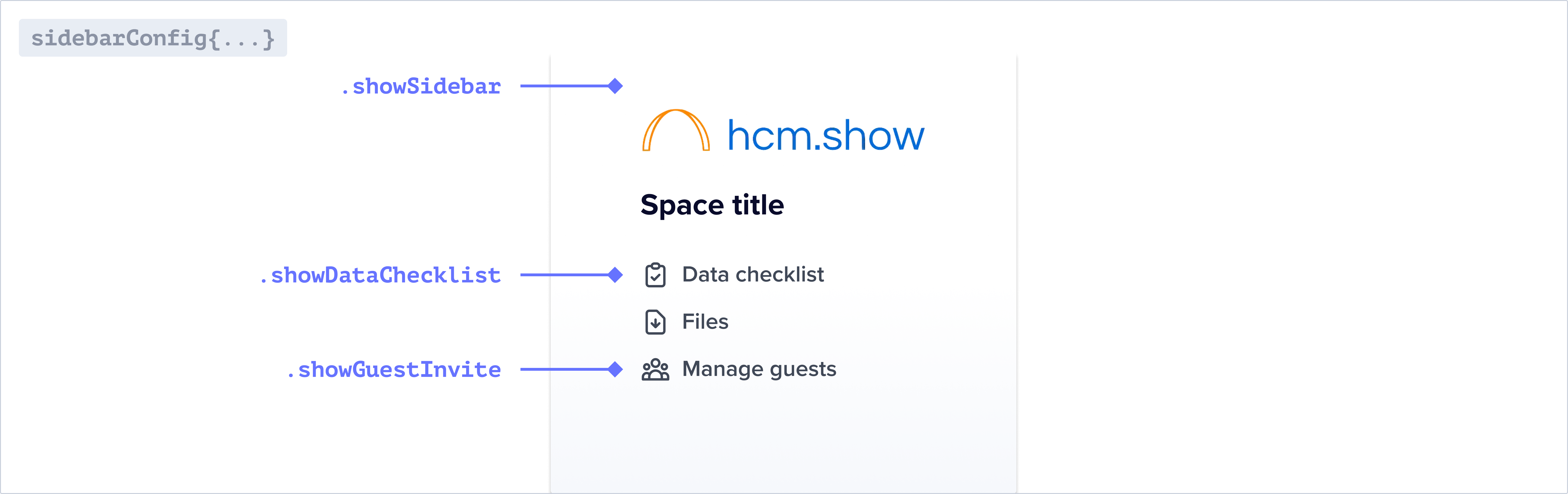 Simply update `metadata.sidebarConfig` when calling `spaces.update()`.
## Building a guest sidebar
Learn how to create a sidebar configuration, and update a sidebar configuration from an event listener.
```javascript listener.js theme={null}
import api from "@flatfile/api";
export default function flatfileEventListener(listener) {
listener.on("file:created", async ({ context: { spaceId } }) => {
try {
const updateSpace = await api.spaces.update(spaceId, {
metadata: {
sidebarConfig: {
showSidebar: false,
},
},
});
console.log(updateSpace.data.metadata?.sidebarConfig);
// Additional code related to the space update process
} catch (error) {
console.error("Error:", error.stack);
// Handle the error appropriately
}
});
}
```
```typescript listener.ts theme={null}
import api from "@flatfile/api";
export default function flatfileEventListener(listener) {
listener.on("file:created", async ({ context: { spaceId } }) => {
try {
const updateSpace = await api.spaces.update(spaceId, {
metadata: {
sidebarConfig: {
showSidebar: false,
},
},
});
console.log(updateSpace.data.metadata?.sidebarConfig);
// Additional code related to the space update process
} catch (error) {
console.error("Error:", error.stack);
// Handle the error appropriately
}
});
}
```
See full code example in our [flatfile-docs-kitchen-sink Github repo](https://github.com/FlatFilers/flatfile-docs-kitchen-sink/blob/main)
## Guest sidebar reference
### `metadata.sidebarConfig`
#### showDataChecklist
**Type:** `boolean`
The data checklist shows all of the data needed for uploading to the primary Workbook.
#### showSidebar
**Type:** `boolean`
Determines if a guest can see the sidebar. If the sidebar is hidden and there are multiple Workbooks in your Space, please specify the desired Workbook ID as your defaultPage.
## Example Project
Find the guest sidebar example in the Flatfile GitHub repository.
* [Clone the guest sidebar example in Typescript](https://github.com/FlatFilers/flatfile-docs-kitchen-sink/blob/main/typescript/guest-sidebar/index.ts)
* [Clone the guest sidebar example in Javascript](https://github.com/FlatFilers/flatfile-docs-kitchen-sink/blob/main/javascript/guest-sidebar/index.js)
Simply update `metadata.sidebarConfig` when calling `spaces.update()`.
## Building a guest sidebar
Learn how to create a sidebar configuration, and update a sidebar configuration from an event listener.
```javascript listener.js theme={null}
import api from "@flatfile/api";
export default function flatfileEventListener(listener) {
listener.on("file:created", async ({ context: { spaceId } }) => {
try {
const updateSpace = await api.spaces.update(spaceId, {
metadata: {
sidebarConfig: {
showSidebar: false,
},
},
});
console.log(updateSpace.data.metadata?.sidebarConfig);
// Additional code related to the space update process
} catch (error) {
console.error("Error:", error.stack);
// Handle the error appropriately
}
});
}
```
```typescript listener.ts theme={null}
import api from "@flatfile/api";
export default function flatfileEventListener(listener) {
listener.on("file:created", async ({ context: { spaceId } }) => {
try {
const updateSpace = await api.spaces.update(spaceId, {
metadata: {
sidebarConfig: {
showSidebar: false,
},
},
});
console.log(updateSpace.data.metadata?.sidebarConfig);
// Additional code related to the space update process
} catch (error) {
console.error("Error:", error.stack);
// Handle the error appropriately
}
});
}
```
See full code example in our [flatfile-docs-kitchen-sink Github repo](https://github.com/FlatFilers/flatfile-docs-kitchen-sink/blob/main)
## Guest sidebar reference
### `metadata.sidebarConfig`
#### showDataChecklist
**Type:** `boolean`
The data checklist shows all of the data needed for uploading to the primary Workbook.
#### showSidebar
**Type:** `boolean`
Determines if a guest can see the sidebar. If the sidebar is hidden and there are multiple Workbooks in your Space, please specify the desired Workbook ID as your defaultPage.
## Example Project
Find the guest sidebar example in the Flatfile GitHub repository.
* [Clone the guest sidebar example in Typescript](https://github.com/FlatFilers/flatfile-docs-kitchen-sink/blob/main/typescript/guest-sidebar/index.ts)
* [Clone the guest sidebar example in Javascript](https://github.com/FlatFilers/flatfile-docs-kitchen-sink/blob/main/javascript/guest-sidebar/index.js)