> ## Documentation Index
> Fetch the complete documentation index at: https://flatfile.com/docs/llms.txt
> Use this file to discover all available pages before exploring further.
# Overview
> Understanding Flatfile's building blocks and architecture
Our platform follows a hierarchical structure designed to provide secure, organized access to various resources and automation capabilities. Understanding these core components and their relationships will help you build more effective data import solutions.
## Platform Architecture
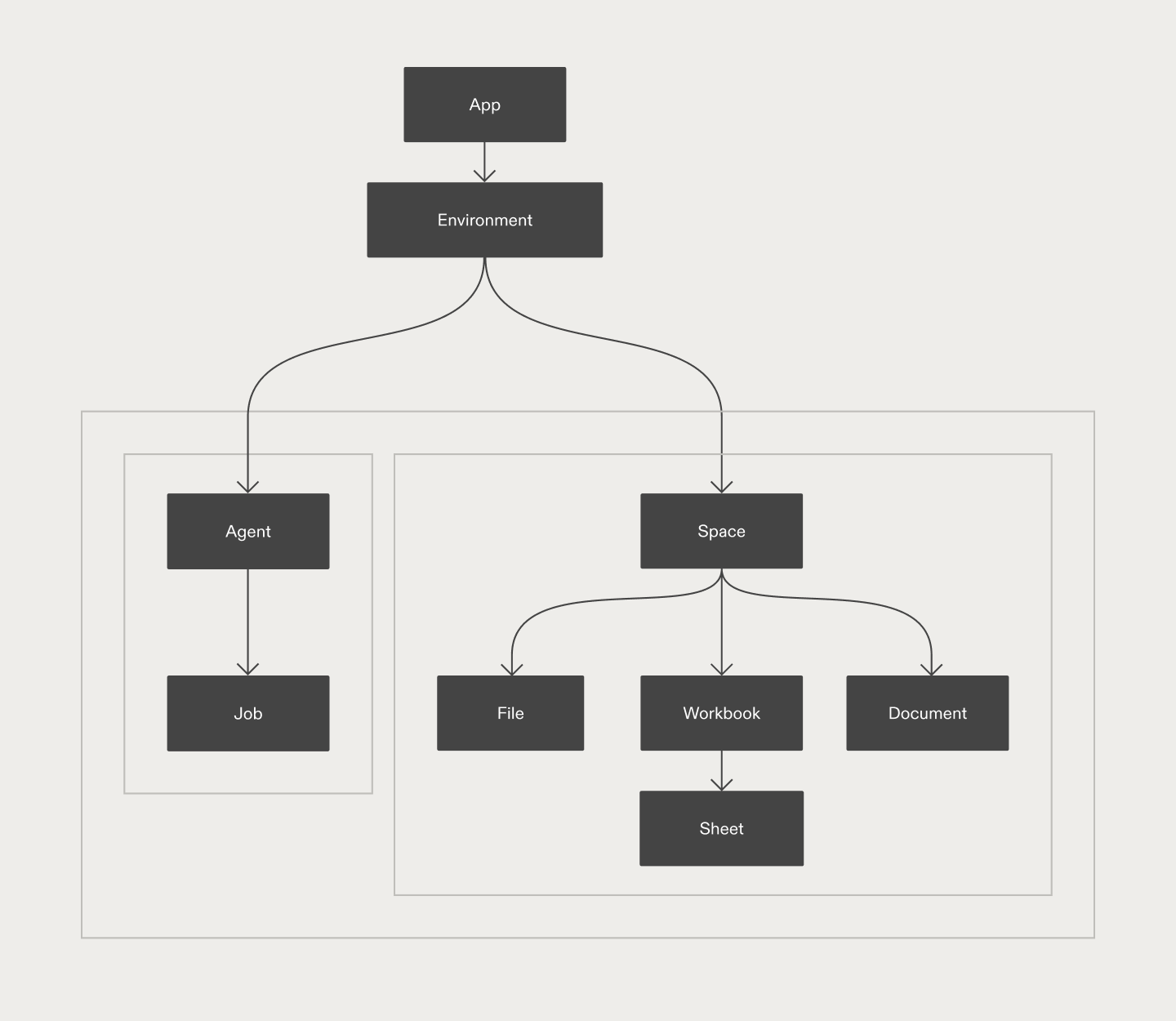
 Flatfile operates as a hosted platform that integrates with your application through APIs and SDKs. Your users interact with Flatfile's interface while you maintain control over the data flow and business logic through event-driven listeners and customizable workflows.
## Core Concepts
Understanding Flatfile's architecture starts with these fundamental concepts, organized by their role in the platform:
### Infrastructure & Organization
Isolated entities that provide secure domains for creating and testing different configurations, with separate API keys for development and production use cases.
Organizational units that manage and coordinate data import workflows across different environments, serving as containers for organizing related Spaces with consistent configuration.
Micro-applications with their own database, filestore, and authentication that serve as isolated workspaces for individual data import sessions or customer data management.
### Data Structure
Complete data definitions that control how your data should look, behave, and connect, serving as intelligent templates that define structure, validation rules, and relationships between sheets.
Standalone webpages within Spaces that provide guidance, instructions, and dynamically-generated content to help users navigate their data import process.
Database-like containers configured with type-strict Blueprints that replace spreadsheet templates for data collection, allowing users to validate, correct, and import data with real-time feedback.
Individual data tables within Workbooks that organize and structure imported data, similar to database tables or spreadsheet tabs, with each sheet representing a distinct data type or entity.
Individual column definitions within sheets that specify data type, format, and validation constraints for each piece of data, similar to columns in a spreadsheet or database table.
Individual data rows that contain actual imported values conforming to field definitions, representing the data instances that flow through import workflows from upload to export.
### Automation & Processing
Form the foundation of Flatfile's automation - Events are published whenever something happens in Flatfile, and Listeners are functions you write that respond to these Events by executing custom code.
Large units of work performed asynchronously on resources like files, Workbooks, or Sheets, providing visibility into the status and progress of data processing tasks. Jobs are powered by [Events](/core-concepts/listeners#events), and are run within by [Listeners](/core-concepts/listeners).
Code-based operations that run when users click buttons or menu items in Flatfile, which can be mounted on Sheets, Workbooks, Documents, or Files to trigger custom operations. Actions are powered by [Jobs](/core-concepts/jobs), and are run within [Listeners](/core-concepts/listeners).
Reusable, modular components that extend Flatfile's data import and processing capabilities, providing pre-built functionality for common tasks like data transformation and integrations.
Flatfile operates as a hosted platform that integrates with your application through APIs and SDKs. Your users interact with Flatfile's interface while you maintain control over the data flow and business logic through event-driven listeners and customizable workflows.
## Core Concepts
Understanding Flatfile's architecture starts with these fundamental concepts, organized by their role in the platform:
### Infrastructure & Organization
Isolated entities that provide secure domains for creating and testing different configurations, with separate API keys for development and production use cases.
Organizational units that manage and coordinate data import workflows across different environments, serving as containers for organizing related Spaces with consistent configuration.
Micro-applications with their own database, filestore, and authentication that serve as isolated workspaces for individual data import sessions or customer data management.
### Data Structure
Complete data definitions that control how your data should look, behave, and connect, serving as intelligent templates that define structure, validation rules, and relationships between sheets.
Standalone webpages within Spaces that provide guidance, instructions, and dynamically-generated content to help users navigate their data import process.
Database-like containers configured with type-strict Blueprints that replace spreadsheet templates for data collection, allowing users to validate, correct, and import data with real-time feedback.
Individual data tables within Workbooks that organize and structure imported data, similar to database tables or spreadsheet tabs, with each sheet representing a distinct data type or entity.
Individual column definitions within sheets that specify data type, format, and validation constraints for each piece of data, similar to columns in a spreadsheet or database table.
Individual data rows that contain actual imported values conforming to field definitions, representing the data instances that flow through import workflows from upload to export.
### Automation & Processing
Form the foundation of Flatfile's automation - Events are published whenever something happens in Flatfile, and Listeners are functions you write that respond to these Events by executing custom code.
Large units of work performed asynchronously on resources like files, Workbooks, or Sheets, providing visibility into the status and progress of data processing tasks. Jobs are powered by [Events](/core-concepts/listeners#events), and are run within by [Listeners](/core-concepts/listeners).
Code-based operations that run when users click buttons or menu items in Flatfile, which can be mounted on Sheets, Workbooks, Documents, or Files to trigger custom operations. Actions are powered by [Jobs](/core-concepts/jobs), and are run within [Listeners](/core-concepts/listeners).
Reusable, modular components that extend Flatfile's data import and processing capabilities, providing pre-built functionality for common tasks like data transformation and integrations.