> ## Documentation Index
> Fetch the complete documentation index at: https://flatfile.com/docs/llms.txt
> Use this file to discover all available pages before exploring further.
# 03: Adding Actions to Your Listener
> Build on your basic Listener by adding user Actions to create interactive data processing workflows.
In the [previous guides](/coding-tutorial/101-your-first-listener/101.02-adding-validation), we created a Listener with Space configuration and data validation. Now we'll extend that Listener to handle user Actions, allowing users to submit and process their data.
**Following along?** Download the starting code from our [Getting Started repository](https://github.com/FlatFilers/getting-started/tree/main/101.02-adding-validation) and refactor it as we go, or jump directly to the [final version with actions](https://github.com/FlatFilers/getting-started/tree/main/101.03-adding-actions).
## What Are Actions?
[Actions](/core-concepts/actions) are interactive buttons that appear in the Flatfile interface, allowing users to trigger custom operations on their data. Common Actions include:
* **Submit**: Process your data and POST it to your system via API
* **Validate**: Run custom validation rules
* **Transform**: Apply data transformations
* **Export**: Generate reports or exports
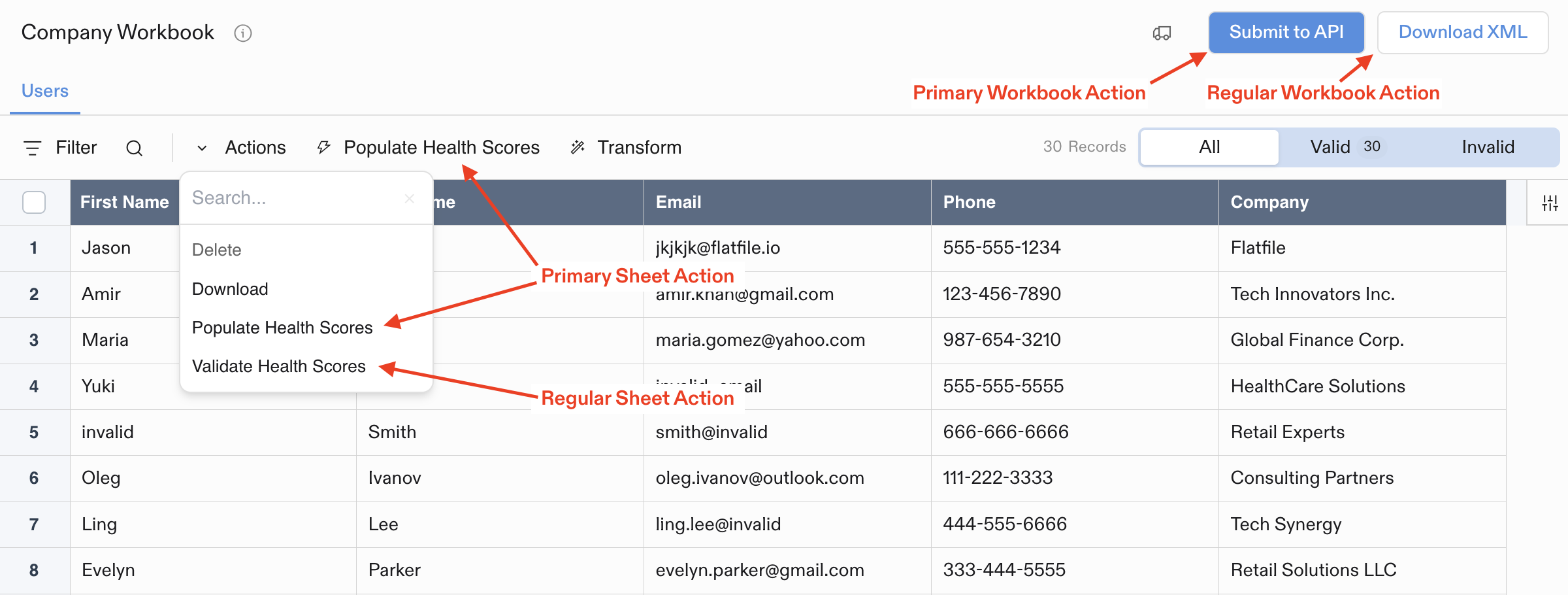 For more detail on using Actions, see our [Actions](/guides/using-actions) guide.
## What Changes We're Making
To add Actions to our Listener with validation, we need to make two specific changes:
### 1. Add Actions Array to Blueprint Definition
In the `space:configure` Listener, we'll add an `actions` array to our Workbook creation. This enhances our [Blueprint](/core-concepts/blueprints) to include interactive elements:
```javascript theme={null}
actions: [
{
label: "Submit",
description: "Send data to destination system",
operation: "submitActionForeground",
mode: "foreground",
},
]
```
### 2. Add Action Handler Listener
We'll add a new Listener to handle when users click the Submit button:
```javascript theme={null}
listener.on(
"job:ready",
{ job: "workbook:submitActionForeground" },
async (event) => {
// Handle the action...
}
);
```
## Complete Example with Actions
This example builds on the Listener we created in the [previous tutorials](/coding-tutorial/101-your-first-listener/101.02-adding-validation). It includes the complete functionality: Space configuration, email validation, and Actions.
```javascript JavaScript theme={null}
import api from "@flatfile/api";
export default function (listener) {
// Configure the space when it's created
listener.on("job:ready", { job: "space:configure" }, async (event) => {
const { jobId, spaceId } = event.context;
try {
// Acknowledge the job
await api.jobs.ack(jobId, {
info: "Setting up your workspace...",
progress: 10,
});
// Create the Workbook with Sheets and Actions
await api.workbooks.create({
spaceId,
name: "My Workbook",
sheets: [
{
name: "contacts",
slug: "contacts",
fields: [
{ key: "name", type: "string", label: "Full Name" },
{ key: "email", type: "string", label: "Email" },
],
},
],
actions: [
{
label: "Submit",
description: "Send data to destination system",
operation: "submitActionForeground",
mode: "foreground",
primary: true,
},
],
});
// Update progress
await api.jobs.update(jobId, {
info: "Workbook created successfully",
progress: 75,
});
// Complete the job
await api.jobs.complete(jobId, {
outcome: {
message: "Workspace configured successfully!",
acknowledge: true,
},
});
} catch (error) {
console.error("Error configuring space:", error);
// Fail the job if something goes wrong
await api.jobs.fail(jobId, {
outcome: {
message: `Failed to configure workspace: ${error.message}`,
acknowledge: true,
},
});
}
});
// Handle when someone clicks Submit
listener.on(
"job:ready",
{ job: "workbook:submitActionForeground" },
async (event) => {
const { jobId, workbookId } = event.context;
try {
// Acknowledge the job
await api.jobs.ack(jobId, {
info: "Starting data processing...",
progress: 10,
});
// Get the data
const job = await api.jobs.get(jobId);
// Update progress
await api.jobs.update(jobId, {
info: "Retrieving records...",
progress: 30,
});
// Get the sheets
const { data: sheets } = await api.sheets.list({ workbookId });
// Get and count the records
const records = {};
let recordsCount = 0;
for (const sheet of sheets) {
const {
data: { records: sheetRecords },
} = await api.records.get(sheet.id);
records[sheet.name] = sheetRecords;
recordsCount += sheetRecords.length;
}
// Update progress
await api.jobs.update(jobId, {
info: `Processing ${sheets.length} sheets with ${recordsCount} records...`,
progress: 60,
});
// Process the data (log to console for now)
console.log("Processing records:", JSON.stringify(records, null, 2));
// Complete the job
await api.jobs.complete(jobId, {
outcome: {
message: `Successfully processed ${sheets.length} sheets with ${recordsCount} records!`,
acknowledge: true,
},
});
} catch (error) {
console.error("Error processing data:", error);
// Fail the job if something goes wrong
await api.jobs.fail(jobId, {
outcome: {
message: `Data processing failed: ${error.message}`,
acknowledge: true,
},
});
}
},
);
// Listen for commits and validate email format
listener.on("commit:created", async (event) => {
const { sheetId } = event.context;
try {
// Get records from the sheet
const response = await api.records.get(sheetId);
const records = response.data.records;
// Simple email validation regex
const emailRegex = /^[^\s@]+@[^\s@]+\.[^\s@]+$/;
// Prepare updates for records with invalid emails
const updates = [];
for (const record of records) {
const emailValue = record.values.email?.value;
if (emailValue) {
const email = emailValue.toLowerCase();
if (!emailRegex.test(email)) {
updates.push({
id: record.id,
values: {
email: {
value: email,
messages: [
{
type: "error",
message:
"Please enter a valid email address (e.g., user@example.com)",
},
],
},
},
});
}
}
}
// Update records with validation messages
if (updates.length > 0) {
await api.records.update(sheetId, updates);
}
} catch (error) {
console.error("Error during validation:", error);
}
});
}
```
```typescript TypeScript theme={null}
import type { FlatfileListener } from "@flatfile/listener";
import api, { Flatfile } from "@flatfile/api";
export default function (listener: FlatfileListener) {
// Configure the space when it's created
listener.on("job:ready", { job: "space:configure" }, async (event) => {
const { jobId, spaceId } = event.context;
try {
// Acknowledge the job
await api.jobs.ack(jobId, {
info: "Setting up your workspace...",
progress: 10
});
// Create the Workbook with Sheets and Actions
await api.workbooks.create({
spaceId,
name: "My Workbook",
sheets: [
{
name: "contacts",
slug: "contacts",
fields: [
{ key: "name", type: "string", label: "Full Name" },
{ key: "email", type: "string", label: "Email" },
],
},
],
actions: [
{
label: "Submit",
description: "Send data to destination system",
operation: "submitActionForeground",
mode: "foreground",
primary: true,
},
],
});
// Update progress
await api.jobs.update(jobId, {
info: "Workbook created successfully",
progress: 75
});
// Complete the job
await api.jobs.complete(jobId, {
outcome: {
message: "Workspace configured successfully!",
acknowledge: true
}
});
} catch (error) {
console.error("Error configuring space:", error);
// Fail the job if something goes wrong
await api.jobs.fail(jobId, {
outcome: {
message: `Failed to configure workspace: ${error instanceof Error ? error.message : 'Unknown error'}`,
acknowledge: true
}
});
}
});
// Handle when someone clicks Submit
listener.on(
"job:ready",
{ job: "workbook:submitActionForeground" },
async (event) => {
const { jobId, workbookId } = event.context;
try {
// Acknowledge the job
await api.jobs.ack(jobId, {
info: "Starting data processing...",
progress: 10
});
// Get the data
const job = await api.jobs.get(jobId);
// Update progress
await api.jobs.update(jobId, {
info: "Retrieving records...",
progress: 30
});
// Get the sheets
const { data: sheets } = await api.sheets.list({ workbookId });
// Get and count the records
const records: { [name: string]: any[] } = {};
let recordsCount = 0;
for (const sheet of sheets) {
const { data: { records: sheetRecords}} = await api.records.get(sheet.id);
records[sheet.name] = sheetRecords;
recordsCount += sheetRecords.length;
}
// Update progress
await api.jobs.update(jobId, {
info: `Processing ${sheets.length} sheets with ${recordsCount} records...`,
progress: 60
});
// Process the data (log to console for now)
console.log("Processing records:", JSON.stringify(records, null, 2));
// Complete the job
await api.jobs.complete(jobId, {
outcome: {
message: `Successfully processed ${sheets.length} sheets with ${recordsCount} records!`,
acknowledge: true
}
});
} catch (error) {
console.error("Error processing data:", error);
// Fail the job if something goes wrong
await api.jobs.fail(jobId, {
outcome: {
message: `Data processing failed: ${error instanceof Error ? error.message : 'Unknown error'}`,
acknowledge: true
}
});
}
}
);
// Listen for commits and validate email format
listener.on("commit:created", async (event) => {
const { sheetId } = event.context;
try {
// Get records from the sheet
const response = await api.records.get(sheetId);
const records = response.data.records;
// Simple email validation regex
const emailRegex = /^[^\s@]+@[^\s@]+\.[^\s@]+$/;
// Prepare updates for records with invalid emails
const updates: Flatfile.RecordWithLinks[] = [];
for (const record of records) {
const emailValue = record.values.email?.value as string;
if (emailValue) {
const email = emailValue.toLowerCase();
if (!emailRegex.test(email)) {
updates.push({
id: record.id,
values: {
email: {
value: email,
messages: [{
type: "error",
message: "Please enter a valid email address (e.g., user@example.com)",
}],
},
},
});
}
}
}
// Update records with validation messages
if (updates.length > 0) {
await api.records.update(sheetId, updates);
}
} catch (error) {
console.error("Error during validation:", error);
}
});
}
```
**Complete Example**: The full working code for this tutorial step is available in our Getting Started repository: [JavaScript](https://github.com/FlatFilers/getting-started/tree/main/101.03-adding-actions/javascript) | [TypeScript](https://github.com/FlatFilers/getting-started/tree/main/101.03-adding-actions/typescript)
## Understanding Action Modes
Actions can run in different modes:
* **`foreground`**: Runs immediately with real-time progress updates (good for quick operations)
* **`background`**: Runs as a background job (good for longer operations)
The Action operation name (`submitActionForeground`) determines which Listener will handle the Action.
## Testing Your Action
### Local Development
To test your Listener locally, you can use the `flatfile develop` command. This will start a local server that will listen for Events and respond to them, and will also watch for changes to your Listener code and automatically reload the server.
```bash theme={null}
# Run locally with file watching
npx flatfile develop
```
### Step-by-Step Testing
After running your listener locally:
1. Create a new Space in your Flatfile Environment
2. Upload (or manually enter) some data to the contacts Sheet with both valid and invalid email addresses
3. See validation errors appear on invalid email Fields
4. Click the "Submit" button
5. Watch the logging in the terminal as your data is processed and the job is completed
## What Just Happened?
Your Listener now handles three key Events and provides a complete data import workflow. Here's how the new action handling works:
### 1. Blueprint Definition with Actions
We enhanced the [Blueprint](/core-concepts/blueprints) definition to include action buttons that users can interact with. Adding actions to your workbook configuration is part of defining your Blueprint.
```javascript JavaScript theme={null}
actions: [
{
label: "Submit",
description: "Send data to destination system",
operation: "submitActionForeground",
mode: "foreground",
primary: true,
},
]
```
```typescript TypeScript theme={null}
actions: [
{
label: "Submit",
description: "Send data to destination system",
operation: "submitActionForeground",
mode: "foreground",
primary: true,
},
]
```
### 2. Listen for Action Events
When users click the Submit button, Flatfile triggers a [Job](/core-concepts/jobs) that your listener can handle using the same approach we used for the `space:configure` job in [101.01](/coding-tutorial/101-your-first-listener/101.01-first-listener#2-listen-for-space-configuration).
Jobs are named with the pattern `:`. In this case, the domain is `workbook` since we've mounted the Action to the Workbook blueprint, and the operation is `submitActionForeground` as defined in the Action definition.
```javascript JavaScript theme={null}
listener.on(
"job:ready",
{ job: "workbook:submitActionForeground" },
async (event) => {
const { jobId, workbookId } = event.context;
```
```typescript TypeScript theme={null}
listener.on(
"job:ready",
{ job: "workbook:submitActionForeground" },
async (event) => {
const { jobId, workbookId } = event.context;
```
### 3. Retrieve and Process Data
Get all the data from the workbook and process it according to your business logic.
```javascript JavaScript theme={null}
// Get the sheets
const { data: sheets } = await api.sheets.list({ workbookId });
// Get and count the records
const records = {};
let recordsCount = 0;
for (const sheet of sheets) {
const { data: { records: sheetRecords } } = await api.records.get(sheet.id);
records[sheet.name] = sheetRecords;
recordsCount += sheetRecords.length;
}
```
```typescript TypeScript theme={null}
// Get the sheets
const { data: sheets } = await api.sheets.list({ workbookId });
// Get and count the records
const records: { [name: string]: any[] } = {};
let recordsCount = 0;
for (const sheet of sheets) {
const { data: { records: sheetRecords }} = await api.records.get(sheet.id);
records[sheet.name] = sheetRecords;
recordsCount += sheetRecords.length;
}
```
### 4. Provide User Feedback
Keep users informed about the processing with progress updates and final results.
```javascript JavaScript theme={null}
// Update progress during processing
await api.jobs.update(jobId, {
info: `Processing ${sheets.length} sheets with ${recordsCount} records...`,
progress: 60,
});
// Complete with success message
await api.jobs.complete(jobId, {
outcome: {
message: `Successfully processed ${sheets.length} sheets with ${recordsCount} records!`,
acknowledge: true,
},
});
```
```typescript TypeScript theme={null}
// Update progress during processing
await api.jobs.update(jobId, {
info: `Processing ${sheets.length} sheets with ${recordsCount} records...`,
progress: 60
});
// Complete with success message
await api.jobs.complete(jobId, {
outcome: {
message: `Successfully processed ${sheets.length} sheets with ${recordsCount} records!`,
acknowledge: true
}
});
```
Your complete Listener now handles:
* **`space:configure`** - Defines the Blueprint with interactive actions
* **`commit:created`** - Validates email format when users commit changes
* **`workbook:submitActionForeground`** - Processes data when users click Submit
The Action follows the same Job lifecycle pattern: **acknowledge → update progress → complete** (or fail on error). This provides users with real-time feedback during data processing, while validation ensures data quality throughout the import process.
## Next Steps
Congratulations! You now have a complete Listener that handles Space configuration, data validation, and user Actions.
For more detailed information:
* Learn more about [Actions](/guides/using-actions)
* Understand Job lifecycle patterns in [Jobs](/core-concepts/jobs)
* Learn more about [Events](/reference/events)
* Organize your Listeners with [Namespaces](/guides/namespaces-and-filters)
* Explore [plugins](/core-concepts/plugins): [Job Handler](/plugins/job-handler) and [Space Configure](/plugins/space-configure)
For more detail on using Actions, see our [Actions](/guides/using-actions) guide.
## What Changes We're Making
To add Actions to our Listener with validation, we need to make two specific changes:
### 1. Add Actions Array to Blueprint Definition
In the `space:configure` Listener, we'll add an `actions` array to our Workbook creation. This enhances our [Blueprint](/core-concepts/blueprints) to include interactive elements:
```javascript theme={null}
actions: [
{
label: "Submit",
description: "Send data to destination system",
operation: "submitActionForeground",
mode: "foreground",
},
]
```
### 2. Add Action Handler Listener
We'll add a new Listener to handle when users click the Submit button:
```javascript theme={null}
listener.on(
"job:ready",
{ job: "workbook:submitActionForeground" },
async (event) => {
// Handle the action...
}
);
```
## Complete Example with Actions
This example builds on the Listener we created in the [previous tutorials](/coding-tutorial/101-your-first-listener/101.02-adding-validation). It includes the complete functionality: Space configuration, email validation, and Actions.
```javascript JavaScript theme={null}
import api from "@flatfile/api";
export default function (listener) {
// Configure the space when it's created
listener.on("job:ready", { job: "space:configure" }, async (event) => {
const { jobId, spaceId } = event.context;
try {
// Acknowledge the job
await api.jobs.ack(jobId, {
info: "Setting up your workspace...",
progress: 10,
});
// Create the Workbook with Sheets and Actions
await api.workbooks.create({
spaceId,
name: "My Workbook",
sheets: [
{
name: "contacts",
slug: "contacts",
fields: [
{ key: "name", type: "string", label: "Full Name" },
{ key: "email", type: "string", label: "Email" },
],
},
],
actions: [
{
label: "Submit",
description: "Send data to destination system",
operation: "submitActionForeground",
mode: "foreground",
primary: true,
},
],
});
// Update progress
await api.jobs.update(jobId, {
info: "Workbook created successfully",
progress: 75,
});
// Complete the job
await api.jobs.complete(jobId, {
outcome: {
message: "Workspace configured successfully!",
acknowledge: true,
},
});
} catch (error) {
console.error("Error configuring space:", error);
// Fail the job if something goes wrong
await api.jobs.fail(jobId, {
outcome: {
message: `Failed to configure workspace: ${error.message}`,
acknowledge: true,
},
});
}
});
// Handle when someone clicks Submit
listener.on(
"job:ready",
{ job: "workbook:submitActionForeground" },
async (event) => {
const { jobId, workbookId } = event.context;
try {
// Acknowledge the job
await api.jobs.ack(jobId, {
info: "Starting data processing...",
progress: 10,
});
// Get the data
const job = await api.jobs.get(jobId);
// Update progress
await api.jobs.update(jobId, {
info: "Retrieving records...",
progress: 30,
});
// Get the sheets
const { data: sheets } = await api.sheets.list({ workbookId });
// Get and count the records
const records = {};
let recordsCount = 0;
for (const sheet of sheets) {
const {
data: { records: sheetRecords },
} = await api.records.get(sheet.id);
records[sheet.name] = sheetRecords;
recordsCount += sheetRecords.length;
}
// Update progress
await api.jobs.update(jobId, {
info: `Processing ${sheets.length} sheets with ${recordsCount} records...`,
progress: 60,
});
// Process the data (log to console for now)
console.log("Processing records:", JSON.stringify(records, null, 2));
// Complete the job
await api.jobs.complete(jobId, {
outcome: {
message: `Successfully processed ${sheets.length} sheets with ${recordsCount} records!`,
acknowledge: true,
},
});
} catch (error) {
console.error("Error processing data:", error);
// Fail the job if something goes wrong
await api.jobs.fail(jobId, {
outcome: {
message: `Data processing failed: ${error.message}`,
acknowledge: true,
},
});
}
},
);
// Listen for commits and validate email format
listener.on("commit:created", async (event) => {
const { sheetId } = event.context;
try {
// Get records from the sheet
const response = await api.records.get(sheetId);
const records = response.data.records;
// Simple email validation regex
const emailRegex = /^[^\s@]+@[^\s@]+\.[^\s@]+$/;
// Prepare updates for records with invalid emails
const updates = [];
for (const record of records) {
const emailValue = record.values.email?.value;
if (emailValue) {
const email = emailValue.toLowerCase();
if (!emailRegex.test(email)) {
updates.push({
id: record.id,
values: {
email: {
value: email,
messages: [
{
type: "error",
message:
"Please enter a valid email address (e.g., user@example.com)",
},
],
},
},
});
}
}
}
// Update records with validation messages
if (updates.length > 0) {
await api.records.update(sheetId, updates);
}
} catch (error) {
console.error("Error during validation:", error);
}
});
}
```
```typescript TypeScript theme={null}
import type { FlatfileListener } from "@flatfile/listener";
import api, { Flatfile } from "@flatfile/api";
export default function (listener: FlatfileListener) {
// Configure the space when it's created
listener.on("job:ready", { job: "space:configure" }, async (event) => {
const { jobId, spaceId } = event.context;
try {
// Acknowledge the job
await api.jobs.ack(jobId, {
info: "Setting up your workspace...",
progress: 10
});
// Create the Workbook with Sheets and Actions
await api.workbooks.create({
spaceId,
name: "My Workbook",
sheets: [
{
name: "contacts",
slug: "contacts",
fields: [
{ key: "name", type: "string", label: "Full Name" },
{ key: "email", type: "string", label: "Email" },
],
},
],
actions: [
{
label: "Submit",
description: "Send data to destination system",
operation: "submitActionForeground",
mode: "foreground",
primary: true,
},
],
});
// Update progress
await api.jobs.update(jobId, {
info: "Workbook created successfully",
progress: 75
});
// Complete the job
await api.jobs.complete(jobId, {
outcome: {
message: "Workspace configured successfully!",
acknowledge: true
}
});
} catch (error) {
console.error("Error configuring space:", error);
// Fail the job if something goes wrong
await api.jobs.fail(jobId, {
outcome: {
message: `Failed to configure workspace: ${error instanceof Error ? error.message : 'Unknown error'}`,
acknowledge: true
}
});
}
});
// Handle when someone clicks Submit
listener.on(
"job:ready",
{ job: "workbook:submitActionForeground" },
async (event) => {
const { jobId, workbookId } = event.context;
try {
// Acknowledge the job
await api.jobs.ack(jobId, {
info: "Starting data processing...",
progress: 10
});
// Get the data
const job = await api.jobs.get(jobId);
// Update progress
await api.jobs.update(jobId, {
info: "Retrieving records...",
progress: 30
});
// Get the sheets
const { data: sheets } = await api.sheets.list({ workbookId });
// Get and count the records
const records: { [name: string]: any[] } = {};
let recordsCount = 0;
for (const sheet of sheets) {
const { data: { records: sheetRecords}} = await api.records.get(sheet.id);
records[sheet.name] = sheetRecords;
recordsCount += sheetRecords.length;
}
// Update progress
await api.jobs.update(jobId, {
info: `Processing ${sheets.length} sheets with ${recordsCount} records...`,
progress: 60
});
// Process the data (log to console for now)
console.log("Processing records:", JSON.stringify(records, null, 2));
// Complete the job
await api.jobs.complete(jobId, {
outcome: {
message: `Successfully processed ${sheets.length} sheets with ${recordsCount} records!`,
acknowledge: true
}
});
} catch (error) {
console.error("Error processing data:", error);
// Fail the job if something goes wrong
await api.jobs.fail(jobId, {
outcome: {
message: `Data processing failed: ${error instanceof Error ? error.message : 'Unknown error'}`,
acknowledge: true
}
});
}
}
);
// Listen for commits and validate email format
listener.on("commit:created", async (event) => {
const { sheetId } = event.context;
try {
// Get records from the sheet
const response = await api.records.get(sheetId);
const records = response.data.records;
// Simple email validation regex
const emailRegex = /^[^\s@]+@[^\s@]+\.[^\s@]+$/;
// Prepare updates for records with invalid emails
const updates: Flatfile.RecordWithLinks[] = [];
for (const record of records) {
const emailValue = record.values.email?.value as string;
if (emailValue) {
const email = emailValue.toLowerCase();
if (!emailRegex.test(email)) {
updates.push({
id: record.id,
values: {
email: {
value: email,
messages: [{
type: "error",
message: "Please enter a valid email address (e.g., user@example.com)",
}],
},
},
});
}
}
}
// Update records with validation messages
if (updates.length > 0) {
await api.records.update(sheetId, updates);
}
} catch (error) {
console.error("Error during validation:", error);
}
});
}
```
**Complete Example**: The full working code for this tutorial step is available in our Getting Started repository: [JavaScript](https://github.com/FlatFilers/getting-started/tree/main/101.03-adding-actions/javascript) | [TypeScript](https://github.com/FlatFilers/getting-started/tree/main/101.03-adding-actions/typescript)
## Understanding Action Modes
Actions can run in different modes:
* **`foreground`**: Runs immediately with real-time progress updates (good for quick operations)
* **`background`**: Runs as a background job (good for longer operations)
The Action operation name (`submitActionForeground`) determines which Listener will handle the Action.
## Testing Your Action
### Local Development
To test your Listener locally, you can use the `flatfile develop` command. This will start a local server that will listen for Events and respond to them, and will also watch for changes to your Listener code and automatically reload the server.
```bash theme={null}
# Run locally with file watching
npx flatfile develop
```
### Step-by-Step Testing
After running your listener locally:
1. Create a new Space in your Flatfile Environment
2. Upload (or manually enter) some data to the contacts Sheet with both valid and invalid email addresses
3. See validation errors appear on invalid email Fields
4. Click the "Submit" button
5. Watch the logging in the terminal as your data is processed and the job is completed
## What Just Happened?
Your Listener now handles three key Events and provides a complete data import workflow. Here's how the new action handling works:
### 1. Blueprint Definition with Actions
We enhanced the [Blueprint](/core-concepts/blueprints) definition to include action buttons that users can interact with. Adding actions to your workbook configuration is part of defining your Blueprint.
```javascript JavaScript theme={null}
actions: [
{
label: "Submit",
description: "Send data to destination system",
operation: "submitActionForeground",
mode: "foreground",
primary: true,
},
]
```
```typescript TypeScript theme={null}
actions: [
{
label: "Submit",
description: "Send data to destination system",
operation: "submitActionForeground",
mode: "foreground",
primary: true,
},
]
```
### 2. Listen for Action Events
When users click the Submit button, Flatfile triggers a [Job](/core-concepts/jobs) that your listener can handle using the same approach we used for the `space:configure` job in [101.01](/coding-tutorial/101-your-first-listener/101.01-first-listener#2-listen-for-space-configuration).
Jobs are named with the pattern `:`. In this case, the domain is `workbook` since we've mounted the Action to the Workbook blueprint, and the operation is `submitActionForeground` as defined in the Action definition.
```javascript JavaScript theme={null}
listener.on(
"job:ready",
{ job: "workbook:submitActionForeground" },
async (event) => {
const { jobId, workbookId } = event.context;
```
```typescript TypeScript theme={null}
listener.on(
"job:ready",
{ job: "workbook:submitActionForeground" },
async (event) => {
const { jobId, workbookId } = event.context;
```
### 3. Retrieve and Process Data
Get all the data from the workbook and process it according to your business logic.
```javascript JavaScript theme={null}
// Get the sheets
const { data: sheets } = await api.sheets.list({ workbookId });
// Get and count the records
const records = {};
let recordsCount = 0;
for (const sheet of sheets) {
const { data: { records: sheetRecords } } = await api.records.get(sheet.id);
records[sheet.name] = sheetRecords;
recordsCount += sheetRecords.length;
}
```
```typescript TypeScript theme={null}
// Get the sheets
const { data: sheets } = await api.sheets.list({ workbookId });
// Get and count the records
const records: { [name: string]: any[] } = {};
let recordsCount = 0;
for (const sheet of sheets) {
const { data: { records: sheetRecords }} = await api.records.get(sheet.id);
records[sheet.name] = sheetRecords;
recordsCount += sheetRecords.length;
}
```
### 4. Provide User Feedback
Keep users informed about the processing with progress updates and final results.
```javascript JavaScript theme={null}
// Update progress during processing
await api.jobs.update(jobId, {
info: `Processing ${sheets.length} sheets with ${recordsCount} records...`,
progress: 60,
});
// Complete with success message
await api.jobs.complete(jobId, {
outcome: {
message: `Successfully processed ${sheets.length} sheets with ${recordsCount} records!`,
acknowledge: true,
},
});
```
```typescript TypeScript theme={null}
// Update progress during processing
await api.jobs.update(jobId, {
info: `Processing ${sheets.length} sheets with ${recordsCount} records...`,
progress: 60
});
// Complete with success message
await api.jobs.complete(jobId, {
outcome: {
message: `Successfully processed ${sheets.length} sheets with ${recordsCount} records!`,
acknowledge: true
}
});
```
Your complete Listener now handles:
* **`space:configure`** - Defines the Blueprint with interactive actions
* **`commit:created`** - Validates email format when users commit changes
* **`workbook:submitActionForeground`** - Processes data when users click Submit
The Action follows the same Job lifecycle pattern: **acknowledge → update progress → complete** (or fail on error). This provides users with real-time feedback during data processing, while validation ensures data quality throughout the import process.
## Next Steps
Congratulations! You now have a complete Listener that handles Space configuration, data validation, and user Actions.
For more detailed information:
* Learn more about [Actions](/guides/using-actions)
* Understand Job lifecycle patterns in [Jobs](/core-concepts/jobs)
* Learn more about [Events](/reference/events)
* Organize your Listeners with [Namespaces](/guides/namespaces-and-filters)
* Explore [plugins](/core-concepts/plugins): [Job Handler](/plugins/job-handler) and [Space Configure](/plugins/space-configure)