> ## Documentation Index
> Fetch the complete documentation index at: https://flatfile.com/docs/llms.txt
> Use this file to discover all available pages before exploring further.
# Platform
> Notable additions and updates to the Flatfile platform
#### Advanced Mapping UI Enhancements
The advanced mapping UI has been enhanced, including rule sorting, a search bar, enum mapping functionality, and better empty states.
#### Multi-Part Jobs for Validation Suggestions
Validation suggestion jobs are now processed as multi-part jobs, consolidating multiple batches into a single user-facing job.
#### Enum Rule Type Implementation
An Enum rule type has been implemented in the Mapping UI to map unique values to their enum for enum-typed fields, with a normalized list for enum types.
#### Fixed Suggestions Count
The suggestions count in the context menu now only includes analysis suggestions.
#### Fixed issue with spaces unexpectedly opening in Build Mode
#### Smart Extract Recommendation Improvements
The smart extract feature has been enhanced with better user guidance, including a recommendation badge in the sheet header and an improved upload flow.
#### Transform Dropdown Behavior
The transform dropdown is now closed when a transform starts.
#### Saved Transformations Scope Fix
Saved transformations are now scoped to the current environment, preventing transformations from appearing in the wrong environments.
#### Inline Transformation Suggestions Fix
Suggestion cards from inline transformations no longer appear on top of blocking job modals.
#### Reference Filter in Sheet Blueprints
Reference field filter parameters have been added to the Flatfile API reference and SDK packages.
#### Agent Drawer Behavior
The agent drawer now closes when switching between different workbooks.
#### Chat Tool Repetition
The chat now allows for repeated tools, even if previously rejected or removed, provided the data supports the requested action.
#### Mapping Rule Preview Fix
An issue where subsequent previews for mapping rules were not showing has been resolved by checking if the program ID changes.
#### Snapshot Before Run All
A snapshot is now created before running saved transformations, allowing for rollback from version history.
#### Smarter Chat Interface
We've improved our Smart Extract chat interface for a more streamlined experience, with cleaner and more efficient responses.
#### Enhanced Mapping Rules in Preview
We've updated how mapping rules are used in the preview endpoint, leveraging a new mapping method for improved performance.
#### Fixed Deployment Modal Error
Fixed an issue where the build mode deploy modal would get stuck on the error screen.
#### "Ask in Chat" Column Context Fix
The 'Ask in chat' feature from the column context menu now properly appends a mention of the current column to the AI Assistant input.
#### Snapshot Before Transformation Program
A snapshot is now created before running a transformation program, allowing restoration to the previous state from version history.
#### Stability improvements for event subscriptions
The system now falls back to long polling on SSE failure, addressing issues where SSE connections are blocked by corporate firewalls.
#### Spurious toast notifications fixed
Toast notifications are no longer triggered for validation suggestion job completion.
#### Comments tray icon, Filter collections, and Toolbar counts are themed
Static theming added to Comments tray icon, Filter collections, and Toolbar counts
We're excited to introduce the new Instructions API, which allows you to store and retrieve contextual instructions for guiding users during the data mapping process.
The Instructions API provides a way to associate helpful guidance with specific field sets. When a user is mapping data with a similar field structure, the appropriate instructions can be retrieved and displayed to guide them through the process.
Key features include:
* **Field-specific instructions**: Store instructions for specific combinations of fields
* **Automatic matching**: Instructions are automatically matched to sheets with similar field structures
* **Metadata support**: Add custom metadata to instructions for additional context
* **Full CRUD operations**: Create, read, update, and delete instructions through a RESTful API
#### Create Instructions
```bash theme={null}
POST /v1/instructions
```
**Request Body:**
```json theme={null}
{
"instructions": "Map the 'email' field to the customer's primary email address.",
"fieldKeys": ["first", "last", "email", "subscribed", "phone"],
"metadata": {
"category": "customer-data"
}
}
```
#### Get Instructions by Sheet ID
```bash theme={null}
GET /v1/instructions/sheet/:sheetId
```
#### Update Instructions
```bash theme={null}
PATCH /v1/instructions/:instructionId
```
#### Delete Instructions
```bash theme={null}
DELETE /v1/instructions/:instructionId
```
#### How It Works
Instructions are tied to mapping families, which are collections of fields that share a common structure. The system uses a confidence threshold to determine which instructions to display, ensuring that users only see guidance that's relevant to their current data.
#### Example Usage
Here's a simple example of how to create instructions using the API:
```javascript theme={null}
// Create instructions for customer data fields
fetch('https://api.flatfile.com/v1/instructions?environmentId=us_env_123&scope=us_acc_456', {
method: 'POST',
headers: {
'Authorization': 'Bearer your_secret_key',
'Content-Type': 'application/json'
},
body: JSON.stringify({
instructions: "Map the 'email' field to the customer's primary email address. The 'first' and 'last' fields should be mapped to the customer's first and last name.",
fieldKeys: ["first", "last", "email", "subscribed", "phone"],
metadata: {
category: "customer-data",
importance: "high"
}
})
})
.then(response => response.json())
.then(data => console.log('Instructions created:', data));
```
**Updated Default Data Retention Period**
The default data retention period has been updated from 10 days to 365 days, providing users with a longer default timeframe for data storage. Additionally, the description text has been simplified to "Keeps data for a set duration from its collection" without referencing a specific policy timeframe.
This change gives users more time to work with their data before it expires, while maintaining the flexibility to configure custom retention periods as needed.
**Improved Data Clips Collaborator Experience**
We've enhanced the user experience in Data Clips by hiding the collaborator input when no space guests exist:
* The collaborator input is now automatically hidden in the Data Clip create modal when there are no space guests
* Similarly, the collaborator section is hidden in the share modal when no guests are available
* This provides a cleaner interface by only showing relevant options based on the current space context
This improvement streamlines the Data Clips creation and sharing workflow by removing unnecessary UI elements when they're not applicable.
**Advanced Filters with Field Validation Status**
We've enhanced our filtering capabilities with a new Advanced Filters feature that supports querying by field validation status. This powerful addition allows you to build dynamic filters that combine field selection with validation checks.
Key improvements include:
* Support for the FFQL `is` operator with values of `error` and `valid`
* Ability to create complex filters targeting specific fields with validation issues
* User-friendly interface for building advanced filter queries
* Seamless integration with existing filtering capabilities
For example, you can now easily find all records where a specific field (like "email") has validation errors, or combine this with other conditions to create precise filters for your data cleanup workflows.
This feature is particularly useful for data quality management, allowing you to quickly identify and address problematic fields across your datasets.

The guest URL functionality for DataClips has been enhanced with a more streamlined approach to URL generation and storage:
* The `guestAuthentication` array field has been replaced with a new `guestLinkUrl` string field in the DataClip model
* When updating a DataClip with `sharedLink` set to "unrestricted", a guest link with a permanent access token is generated
* When updating a DataClip with `sharedLink` set to "restricted", a direct sheet URL is generated without a token
* The system now properly handles existing guest links to prevent unnecessary regeneration
* The URL format has been improved for better usability and security
This change provides a more consistent and reliable way to share DataClips with guests, with clearer distinction between restricted and unrestricted access modes.
External links in Documents (both Markdown and HTML) now automatically open in a new tab (`target="_blank"`). This improvement ensures that users don't navigate away from the Flatfile interface when clicking on links within documents, maintaining their current context and workflow.
This change applies to all links in documents, whether they're created using Markdown syntax or HTML anchor tags.
**Preserve Record IDs During Transformations**
We've added a new `keepRecordIds` flag to maintain record IDs during transformations. This enhancement provides greater control over how records are processed during transformation operations.
**Key Benefits:**
* Maintains data consistency across transformation previews
* Preserves record relationships and references
* Improves transformation accuracy by maintaining original record IDs
**Technical Details:**
When `keepRecordIds` is set to `true`, the system uses `updateRecords` instead of the previous add/delete approach, ensuring that record IDs remain unchanged throughout the transformation process. This is particularly valuable when:
* Working with data that has established relationships between records
* Performing multiple transformations where maintaining record identity is important
* Integrating with systems that rely on consistent record identifiers
**Usage:**
The `keepRecordIds` flag can be included in transformation job configurations:
```javascript theme={null}
// Example of creating a transformation job with keepRecordIds
const transformationJobResponse = await HTTPService.createJob({
type: "workbook",
operation: "transform",
source: workbookId,
destination: destinationWorkbookId,
config: {
destinationSheetId: destinationSheetId,
},
input: {
programId: "your-program-id",
version: "v2",
keepRecordIds: true, // Set to true to preserve record IDs
},
});
```
This feature is backward compatible - `keepRecordIds` defaults to `false`, maintaining the existing behavior for current implementations.
New row insertion feature in Flatfile's data tables.
* Users can now add new rows by hovering over row dividers in the index column
* An "Insert row" button appears when hovering between rows
* Clicking the button adds a new row at the selected position
* The feature provides a more intuitive way to add data at specific positions in a table
This enhancement improves the user experience by making row insertion more discoverable and allowing precise control over where new rows are added in the dataset.
Enhanced agent discovery with new search capabilities. Users can now search for agents by either agent slug or agent ID directly from both the agents list view and the agents detail page.
Optimized performance of the getAgents endpoint through pagination implementation. This significantly improving response times and scalability when working with large collections of agents.
Records with readonly configurations are now handled differently in the
replaceRecords operation. A new option called excludeReadOnly has been
introduced to control whether readonly records or fields should be skipped or
replaced. If excludeReadOnly is set to true, records with a readonly config or
fields marked as readonly will not be replaced during the replaceRecords
operation. If excludeReadOnly is false or not provided, readonly records and
fields will be replaced as before.
The findAndReplaceRecords method in the WorkbooksService now checks if the field
being replaced is readonly and throws an error if excludeReadOnly is set to
true, preventing modification of readonly fields.
Several new tests have been added to validate the behavior of the replaceRecords
operation with readonly records and fields, covering scenarios with
excludeReadOnly set to true and false.
The SearchRecordsOptions and GetCellValuesOptions interfaces have been updated
to include the new excludeReadOnly option.
Example usage:
```typescript theme={null}
// Replace non-readonly records or fields
const records = await wb.op.replaceRecords({
sheetId: wb.contacts.id,
options: {},
find: "John",
replace: "Jonathan",
field: { key: "firstName" },
legacyReplace: false,
actorId: UserId.make(),
});
// Skip readonly records or fields
const records = await wb.op.replaceRecords({
sheetId: wb.contacts.id,
options: { excludeReadOnly: true },
find: "John",
replace: "Jonathan",
field: { key: "firstName" },
legacyReplace: false,
actorId: UserId.make(),
});
```
Added language support for:
* Spanish (es-419)
* Malay (ms)
* Dutch (nl)
* Polish (pl)
* Swedish (sv)
* Thai (th)
* Chinese Traditional (zh-hant)
* Chinese Traditional Hong Kong (zh-hant-HK)
Namespace modification is now supported via API only. Other app fields remain
editable via the UI but the ability to edit a namespace has been removed
post-creation.
Fixes bug where long document titles would overlap the page header.
The order of imports from the `@flatfile/api` module has been updated. The `RecordUpdates` and `Success` types are now imported in a different order.
The implementation of the `clearColumn` method has been refactored. Instead of using the `map` and `filter` array methods, it now uses the `reduce` method to generate the `recordsUpdates` array. The new implementation checks if the field value exists and if the field is not read-only before clearing it. This change likely improves performance and readability.
The wording of the `info` and `outcome.message` properties in the `transitionJob` call has been updated from "Column was removed" to "Column was cleared". This change provides more accurate messaging about the action performed.
Additionally, the code now handles read-only fields correctly. If a field is marked as read-only in the `RecordConfig`, its value will not be cleared.
These changes improve the functionality, performance, and messaging of the `clearColumn` logic without introducing any breaking changes to the external interface.
The unique validation and record/cell validity handling has been improved to:
* properly escape field keys containing special characters like periods
* correctly apply the `error` state and appropriate error messages when duplicate values are encountered for fields with a unique constraint
* handle cases where all initially added records have invalid (duplicate) values for fields with a unique constraint
When clearing a column in a job operation, a snapshot of the sheet will be taken
before the column is cleared. This snapshot will be labeled with the specific
column key that is being cleared, providing a record of the sheet state before
the column clearing operation. The snapshot is taken by calling a new utility
function `takeSnapshotForJob`, which handles creating and labeling the snapshot
based on the job, sheet, and column details. This allows developers to review
the sheet state prior to the column clearing if needed.
The release adds the ability to mark a space as an app template and filter
spaces based on whether they are app templates or not.
This can be used with the new space-configure-from-template plugin to create new
spaces using an existing space as a template.
When using AutoBuild for a new App, the space generated during AutoBuild will
automatically be tagged as the template for that App.
We added the ability to sort enum fields by label, value, or ordinal within the enum field config. This will ensure that enums will be displayed in the chosen order in mapping and review table. The default sortBy is label.
The release introduces the ability to filter spaces by the associated app ID
when retrieving a list of spaces. A new query parameter `appId` has been added
to the `/v1/spaces` endpoint. Developers can now pass the `appId` query
parameter to retrieve only the spaces associated with the specified app. For
example, `?appId=us_app_123` will return only spaces linked to the app with ID
`us_app_123`. If an invalid or non-existent app ID is provided, an empty list
will be returned.
An error is now thrown if attempting to clear a readonly column in a sheet. This
prevents modifying data in readonly columns.
Example:
```
const field = {
key: 'ReadonlyColumn',
label: 'Readonly Column',
type: 'string',
readonly: true
}
```
Attempting to clear this column will throw an error: 'Column is readonly and
cannot be cleared'.
An error is also thrown if attempting to clear any column in a readonly sheet.
This prevents modifying data in readonly sheets.
Example:
```
const sheet = {
config: {
readonly: true,
fields: [...]
}
}
```
Attempting to clear a column in this sheet will throw an error: 'Sheet is
readonly. Column cannot be cleared'.
These changes ensure data integrity by preventing unintended modification of
readonly data.
The `clearColumnAction` now has a constraint added that checks if the column is enabled before allowing the action to be executed. This ensures that the action can only be performed on columns that are currently enabled, preventing any potential issues or errors that could arise from attempting to clear a disabled column.
The manual entry and file upload button shown when the workbook is empty have
has their max width updated so they can support more text.
Trailing empty records in CSV files will now be trimmed during file extraction.
Empty records in-between records with values will continue to be kept.
* Record order is now maintained when inserting records
* When using the Flatfile API to add records, the order of those records will
now be preserved keeping the original sequence as provided
Fixes a bug where AI assist would crash when 'config' object or the 'options'
array is undefined.
Fixes a bug where an error would be thrown when config options was undefined
during sheet upsert operations.
There was a bug causing the name of environment secrets not to update when
edited. This fixes the bug ensuring environment secret names are updated.
The `viewMapped` functionality has been updated to include new text strings for
messaging related to updating a table to only view mapped fields. The messages
include "Updating the table to only view mapped fields", "Halfway there, hang
tight...", "Almost done...", "Table update complete. Please audit the data", and
"An error occurred while updating the workbook. See Event Logs." These strings
will be displayed to the user during the process of updating a table to show
only mapped fields, providing status updates and handling potential errors. This
change enhances the user experience by providing clear communication during this
operation.
A bug fix was made to the handling of enum field options when updating a sheet.
Previously, if the `config.options` property was undefined, an error would
occur. Now, if `config.options` is undefined, it defaults to an empty array.
This ensures that the code can safely handle cases where `config.options` is not
present or is undefined. For example, if a developer was updating a sheet with
an enum field that did not previously have any options defined, the update can
now proceed without errors.
Added three keys: `addColumn`, `clearColumn`, and `removeColumn` with their
respective translations for adding, clearing, and removing columns.
In the English translation file, the title of the "mapValues" section has been
updated from "Map values" to "Map Fields".
Updates to the mapping flow to prevent a user from accidentally navigating
"back" into a mapping flow after it has already been completed.
**Bug Fixes in Edit and Create App Forms**
We've resolved several issues affecting the Edit and Create App forms:
* Fixed form validation issues
* Improved error handling
* Enhanced user feedback
Updated the AutoBuild flow to allow editing the working space name during the
build process. The name can now be edited by clicking an icon next to the space
name, which reveals an input field to enter a new name. The name change is saved
when the input field loses focus or the Enter key is pressed. Added a badge
indicating "Dev Mode" when not in the production environment.
Simplified the loading step by removing the detailed progress indicators and
showing only a centered loader component.
Updated the BlueprintTab component to display a bottom border and align the
blueprint view action icons to the right.
Implemented sheet ordering functionality in the sidebar. Sheets are now
displayed in the order specified by the `sheetSidebarOrder` setting in the
workbook. Any sheets not included in the order are appended to the end.
The getDataDiff function has been updated to handle array values correctly when
comparing proposed changes with existing source (src) and artifact data.
If the proposed array value is the same as the existing array value in either
the source or artifacts, it will not be included in the changeset returned by
getDataDiff.
The function now uses the lodash isEqual utility to compare array values,
instead of strict equality (===), to account for differences in order or
reference of array elements.
For example, if the proposed tags array is \['jedi', 'sith'], it will not be
included in the changeset if the existing source tags are \['JEDI', 'SITH'] or if
the existing artifact tags are \['jedi', 'sith'], because the values are
considered equal despite differences in capitalization or array order.
This change ensures that unnecessary changes are not included in the changeset
when working with array values, reducing noise and improving the accuracy of the
changeset calculation.
`@flatfile/api@1.9.17`
Secrets have been updated to introduce new optional fields for filtering.
A new optional `actorId` field of type `ActorId` has been added to the
`ListSecrets` request type and `WriteSecret` type for secrets. This allows
filtering secrets by the associated actor (user, guest, agent, or api key).
`@flatfile/api@1.9.16`
Added new methods to for managing stored sheet constraints: `getConstraints`,
`createConstraint`, `getConstraintById`, `updateConstraint`, and
`deleteConstraint`.
`@flatfile/api@1.9.15`
With the addition of archived spaces there is now an ability to `unarchiveSpace`
method and `space:unarchived` event.
Deprecated use of metadata field at the cell value level, recommending use of
record level metadata instead.
`spaces-ui`
Updates to Snapshots resource to track changes to a sheet's schema (i.e. added
and removed columns). A more robust Snapshot will enable more complex features
when comparing 2 different snapshots.
`@flatfile/api@1.9.14`
#### Actions Resource
Actions are now a first class resource. Developers may now create, retrieve,
update, and delete actions via the api. New action events ActionCreated,
ActionUpdated, and ActionDeleted are now being published and an actionId field
has been added to the Context of events.
#### Agent Versioning
Agents versioning has been introduced. You may now retreieve agent versions via
the api and revert to a previous version via the api and the dashboard.
#### Token Refresh
Guests actively using their space will have their token's automatically renewed.
#### Sheet & Cell Updates
Support for array values in cell values has also been added.
#### Job Metadata
Metadta is now available on the `JobConfig` type, allowing additional data to be
associated with jobs.
Session name validation has been introduced to the dashboard, preventing the
creation of new sessions with the same name.
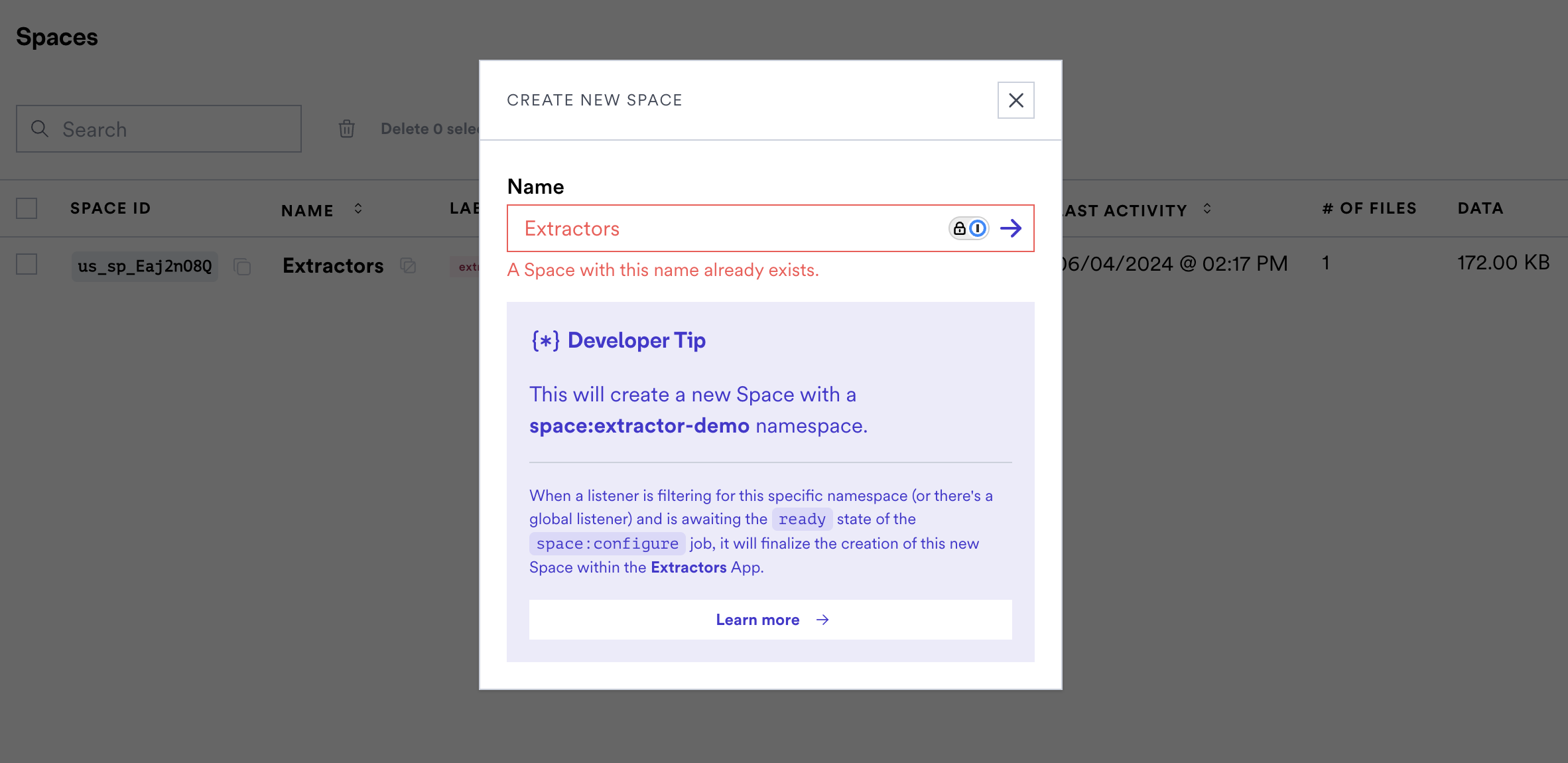 Note that sessions created via embedded or the api will not be constrained, this
is a dashboard only validation.
`@flatfile/api@1.9.13` `spaces-ui`
New fields 'guide' and 'guardrail' have been added to Actions. These options
enable providing markdown guidance and warnings to your users.
```typescript theme={null}
actions: [
{
operation: 'submitActionFg',
mode: 'foreground',
label: 'Submit For Approval',
type: 'string',
description: 'Submit this data to a webhook.',
primary: true,
guide: {
content: "### Personalized Guide \n\n Before performing..."
},
guardrail: {
content: "### Warning! \n\n This Submit ..."
}
},
{...}
],
```
The markdown content of guide will become accessible to the end user via a
tooltip on the action element.
The `guardrail` component will render as a modal warning before the action event
is triggered. This can be useful for actions that have critical consequences or
require user acknowledgment before proceeding.
This can be useful for actions that have critical consequences or require user
acknowledgment before proceeding.
`spaces-ui`
The "requireAllValidTotal" option has been added for custom actions in the Sheet
toolbar. This new option requires all rows in the Sheet to be valid for the
action to be enabled, regardless of selection. If "requireAllValidTotal" is set
and there are any validation errors in the entire Sheet, the custom action will
be disabled with the corresponding tooltip message.
The existing "requireAllValid" option has been updated to only apply to the
selected rows, rather than all rows. If "requireAllValid" is set and there are
validation errors in the selected rows, the custom action will be disabled with
the corresponding tooltip message.
`spaces-ui`
Introduces support for handling locked sheets (indicated by the locked icon),
and improves the handling of import files.
`@flatfile/api@1.9.8`
A new `reference-list` property type has been added to allow defining an array
of values referenced from another sheet. Links will be established automatically
by the matching engine or similar upon an evaluation of unique or similar
columns between datasets.
The `ReferencePropertyConfig` has been updated to make the `relationship`
property optional, allowing it to be omitted.
`@flatfile/api@1.9.7`
New options have been added to the ListWorkbooksRequest to allow filtering
workbooks by name, namespace, label, and treatment, as well as controlling
whether to include sheets. For example, you can now pass a `name` parameter to
filter workbooks by name, or a `treatment` parameter to filter by treatment. The
`includeSheets` boolean parameter controls whether sheet data is included in the
response.
`@flatfile/api@1.9.6`
In AgentConfig type, a new optional property `sourceMap` of type string has been
added. This allows including a source map for the agent code.
`@flatfile/api@1.9.5`
A new property `treatments` of type `Flatfile.WorkbookTreatments[]` has been
added to the `Workbook` and `CreateWorkbookConfig` types. This array allows
specifying treatments for a workbook, with the currently available treatment
being `ExtractedFromSource`. This change introduces a new external interface
that developers using the package should be aware of when creating or updating
workbooks.
Example usage:
```typescript theme={null}
import { Flatfile } from "@flatfile/api";
const workbookConfig: Flatfile.CreateWorkbookConfig = {
// ...other properties
treatments: [Flatfile.WorkbookTreatments.ExtractedFromSource],
};
```
`@flatfile/api@1.9.3`
A new `JobOutcomeTrigger` type has been introduced to specify whether a job
outcome's effect should be triggered automatically or manually.
**Auto-Expanding Cell Input in Editor Component**
We have enhanced the cell editing experience with an auto-expanding cell input
that dynamically adjusts to fit the content. This improvement ensures that users
can view and edit their data without constraints, enhancing the overall editing
experience.
`spaces-ui`
Improvements have been made to error handling and user feedback in the file
import and mapping process. If an error occurs, a popover is displayed to the
user with the error message, providing clearer feedback on failures during the
import process.
**Select Header Row**
We've added a new feature that allows users to select the header row in the data
preview. This feature is particularly useful when the first row of your data
contains column headers, as it enables you to specify the header row for
accurate data mapping.
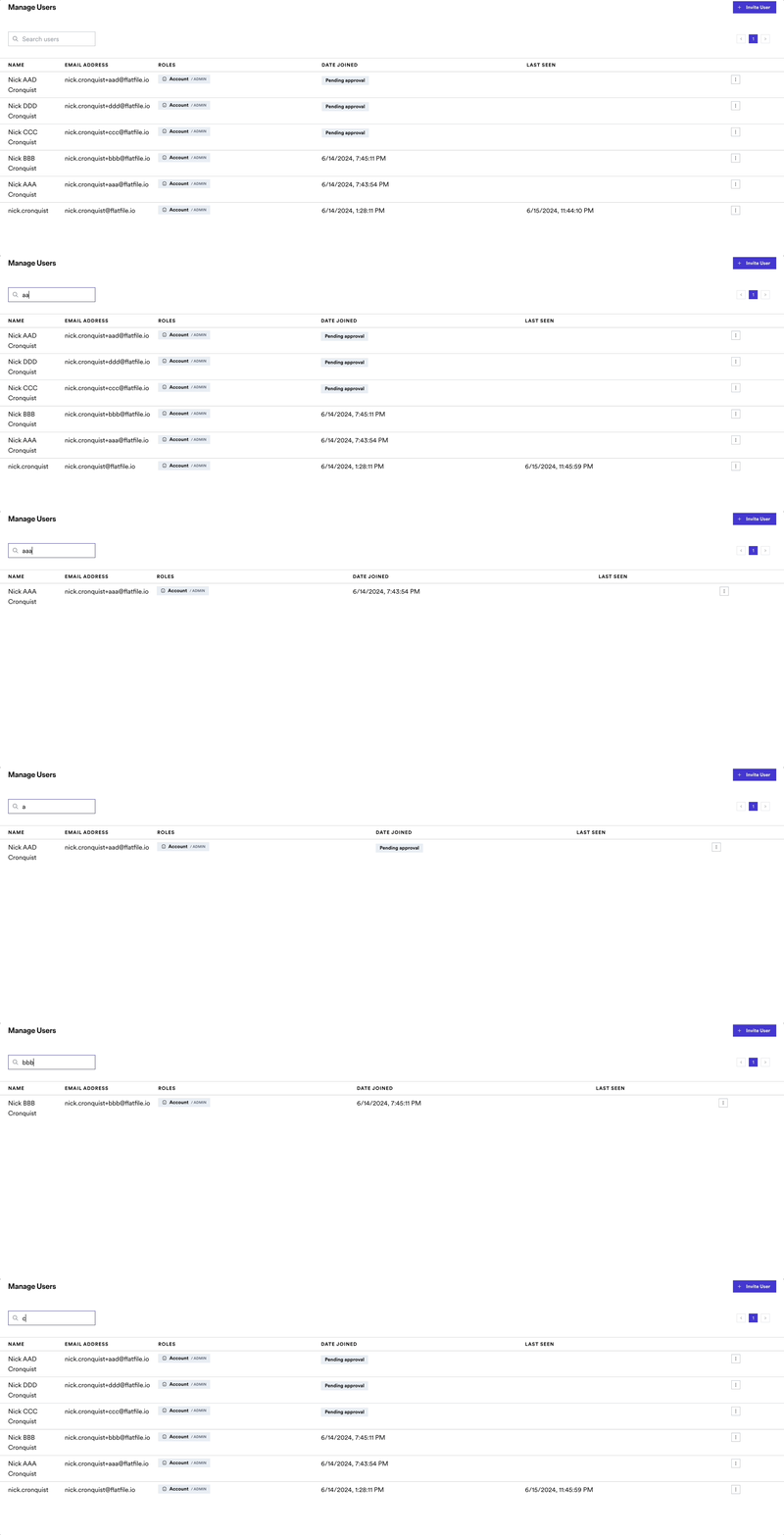
**Search for Users**
You can now search for users in the manager users page. This feature allows you
to quickly find users by name, email, or role, making it easier to manage your
user base.
Note that sessions created via embedded or the api will not be constrained, this
is a dashboard only validation.
`@flatfile/api@1.9.13` `spaces-ui`
New fields 'guide' and 'guardrail' have been added to Actions. These options
enable providing markdown guidance and warnings to your users.
```typescript theme={null}
actions: [
{
operation: 'submitActionFg',
mode: 'foreground',
label: 'Submit For Approval',
type: 'string',
description: 'Submit this data to a webhook.',
primary: true,
guide: {
content: "### Personalized Guide \n\n Before performing..."
},
guardrail: {
content: "### Warning! \n\n This Submit ..."
}
},
{...}
],
```
The markdown content of guide will become accessible to the end user via a
tooltip on the action element.
The `guardrail` component will render as a modal warning before the action event
is triggered. This can be useful for actions that have critical consequences or
require user acknowledgment before proceeding.
This can be useful for actions that have critical consequences or require user
acknowledgment before proceeding.
`spaces-ui`
The "requireAllValidTotal" option has been added for custom actions in the Sheet
toolbar. This new option requires all rows in the Sheet to be valid for the
action to be enabled, regardless of selection. If "requireAllValidTotal" is set
and there are any validation errors in the entire Sheet, the custom action will
be disabled with the corresponding tooltip message.
The existing "requireAllValid" option has been updated to only apply to the
selected rows, rather than all rows. If "requireAllValid" is set and there are
validation errors in the selected rows, the custom action will be disabled with
the corresponding tooltip message.
`spaces-ui`
Introduces support for handling locked sheets (indicated by the locked icon),
and improves the handling of import files.
`@flatfile/api@1.9.8`
A new `reference-list` property type has been added to allow defining an array
of values referenced from another sheet. Links will be established automatically
by the matching engine or similar upon an evaluation of unique or similar
columns between datasets.
The `ReferencePropertyConfig` has been updated to make the `relationship`
property optional, allowing it to be omitted.
`@flatfile/api@1.9.7`
New options have been added to the ListWorkbooksRequest to allow filtering
workbooks by name, namespace, label, and treatment, as well as controlling
whether to include sheets. For example, you can now pass a `name` parameter to
filter workbooks by name, or a `treatment` parameter to filter by treatment. The
`includeSheets` boolean parameter controls whether sheet data is included in the
response.
`@flatfile/api@1.9.6`
In AgentConfig type, a new optional property `sourceMap` of type string has been
added. This allows including a source map for the agent code.
`@flatfile/api@1.9.5`
A new property `treatments` of type `Flatfile.WorkbookTreatments[]` has been
added to the `Workbook` and `CreateWorkbookConfig` types. This array allows
specifying treatments for a workbook, with the currently available treatment
being `ExtractedFromSource`. This change introduces a new external interface
that developers using the package should be aware of when creating or updating
workbooks.
Example usage:
```typescript theme={null}
import { Flatfile } from "@flatfile/api";
const workbookConfig: Flatfile.CreateWorkbookConfig = {
// ...other properties
treatments: [Flatfile.WorkbookTreatments.ExtractedFromSource],
};
```
`@flatfile/api@1.9.3`
A new `JobOutcomeTrigger` type has been introduced to specify whether a job
outcome's effect should be triggered automatically or manually.
**Auto-Expanding Cell Input in Editor Component**
We have enhanced the cell editing experience with an auto-expanding cell input
that dynamically adjusts to fit the content. This improvement ensures that users
can view and edit their data without constraints, enhancing the overall editing
experience.
`spaces-ui`
Improvements have been made to error handling and user feedback in the file
import and mapping process. If an error occurs, a popover is displayed to the
user with the error message, providing clearer feedback on failures during the
import process.
**Select Header Row**
We've added a new feature that allows users to select the header row in the data
preview. This feature is particularly useful when the first row of your data
contains column headers, as it enables you to specify the header row for
accurate data mapping.
**Search for Users**
You can now search for users in the manager users page. This feature allows you
to quickly find users by name, email, or role, making it easier to manage your
user base.
 **Resend User Invite**
There is now a `/users/:userId/resend-invite` endpoint enabling admins to resend
an invitation to a user who has not yet accepted it.
**Bulk Deletion of Mapping Rules**
We added a method to delete multiple mapping rules from a program. This new
`deleteMultipleRules` method simplifies the management of mapping rules by
allowing bulk deletions. The `DeleteMultipleRulesRequest` type represents the
request payload, detailing the array of rule IDs to be deleted.
**New Method to Delete Apps**
We have introduced a new `delete` method that allows you to delete an app.
**Enhanced Validation Messages for Records**
The `ValidationMessage` type has been enhanced with two new optional properties:
`field` and `path`. The `field` property specifies which field the validation
message pertains to, while the `path` property, of type `JsonPathString`,
specifies the JSONPath for the validation message. These enhancements provide
more context and precision in validation feedback.
**Enhanced Job Outcomes with Custom Views**
The `JobOutcomeNext` type now includes a new `view` option, allowing jobs to
specify a custom view that should be displayed upon completion. To support this,
we introduced the `JobOutcomeNextView` type, which provides details for the
custom view, including the sheet ID, hidden columns, and an optional label.
**New Method to Update Sheets**
We introduced a new `updateSheet` method that allows you to update a sheet's
name, slug, and metadata. The `SheetUpdateRequest` type represents the update
request payload, including the name, slug, and metadata of the sheet.
Additionally, an optional `metadata` property has been added to the `Sheet` and
`SheetUpdate` types, allowing for the storage of contextual metadata related to
the sheet.
`spaces-ui`
A new "Update View" button can now be found in the job outcome modal for jobs
that modify the visibility of columns in a workbook sheet. This button triggers
updating the column visibility based on the job outcome.
There are 2 new capabilities to the next property of Job Outcomes:
* `view` gives developers the ability to manipulate the Sheet's view on
completion of a Job - Giving control over things like applying a filter or
hiding a column
* `download` gives developers the ability to include file details (such as a
fileName and URL), which are then used to trigger a download to the user's
browser on completion of the job
**New Environment Lifecycle Events**
We've added new domain `Environment` events expanding the scope of domains our
system recognizes. To leverage these events, you can listen on to the following
topics: The corresponding event topics are `environment:created`,
`environment:updated`, and `environment:deleted`.
**Enhanced Job Configuration Descriptions**
We have added descriptions for the DeleteRecordsJobConfig properties to provide
better clarity: An optional `filter` param allows allows you to provide options
to filter records, with the default set to none while the `filterField` param
enables narrowing the valid/error filter results to a specific field, but it
requires the filter to be set.
We corrected a typo in the `JobOutcomeNextFiles` type by renaming the file
property to files to accurately represent an array of file objects.
`spaces-ui`
#### Saving and Sharing Custom Views
Users can now apply filters, sorting, and search queries to the Sheet data and
save those settings as a reusable view. Key changes include:
* Added a "Views" dropdown in the Sheet toolbar to manage and apply saved views.
* Added a "Save View" modal that allows users to name and save the current Sheet
filters/sorting as a view.
* Users can copy a sharable link with the view settings applied.
* Saved views are grouped into "My Views" and "All Views" sections.
* Added backend APIs to create, update, and delete saved views.
* Added new React hooks and components to support the saved views functionality.
* Updated translations for the new UI elements related to saved views.
**Updated `ListDocumentsResponse`**
The `data` property now returns an array of `Document` objects instead of the
previous `DocumentResponse`. This change standardizes the format and improves
consistency in how document data is handled.
**Enhanced Job Configuration**
We added a new `predecessorIds` property to `JobConfig`. This property allows
you to specify job dependencies, meaning you can list the IDs of jobs that must
be completed before the current job can start. This helps in managing and
sequencing job execution more effectively.
We added a new feature to handle job outcomes more effectively with a new type
called `JobOutcomeNext` and its variant files. This includes:
* `JobOutcomeNextFileObject` Stores individual file information with an ID and
optional label.
* `JobOutcomeNextFiles` Handles multiple files, including an array of
JobOutcomeNextFileObject instances and an optional label.
We also added a waiting value to the JobStatus enum to indicate when a job is
paused or pending, improving job processing workflows.
**Enhanced Views Request and Response**
We updated `ListViewsRequest` to include optional `pageSize` and `pageNumber`
properties, allowing for pagination when retrieving views. We've also added a
`createdBy` property to `View` and `ViewResponse` to track the creator of each
view.
**Improved event emission logic for workbook creation and update**
Previously, the `workbook:created` event was emitted even when the workbook was
only being updated. Now, the logic emits a `workbook:updated` event when
necessary. Additionally, the `POST /:workbookId/rebuild` endpoint now handles
eventing properly.
**Enhanced Date Parsing Capabilities**
**Expanded Support for Date Formats**:
We've broadened our parsing algorithms to accurately recognize and sort a wider
variety of date formats. This update ensures that when users upload files
containing date fields, the system robustly handles various international date
formats and styles.
**Improved Sorting Accuracy**:
Dates are now correctly sorted based on their actual chronological order,
regardless of the format input. This enhancement reduces errors and
inconsistencies previously encountered with date sorting, ensuring data
integrity and reliability during file uploads.
**User Experience Improvement**:
Users no longer need to modify or standardize date formats in their files before
uploading. Flatfile automatically interprets and processes diverse date inputs,
simplifying workflows and reducing manual data preprocessing.
**Sorted Workbooks in Mapping**
Selecting a Sheet in the mapping flow has been updated to apply the same sort
order consideration as the sidebar. This enhancement ensures consistency in
workbook sorting for improved user navigation.
**Origin info now exists in Files table**
Now, origin tracking is available for file uploads, supporting sources like
Google Drive, File System, Box, and OneDrive.
**Improved Duplicate Field Key Validation in Workbook Sheets**
**Case-Insensitive Checking**:
Our latest update enhances the validation process by identifying duplicate field
keys in workbook sheets, including case-insensitive comparisons. This ensures
that field keys are unique regardless of character casing, maintaining data
integrity and consistency across your datasets.
**Data Integrity Assurance**:
By preventing the entry of duplicate keys, even when differences are only in
letter casing, we enhance the accuracy and reliability of data processing within
our application.
When uploading a file, you'll now see upload speeds in a user-friendly format
(KB/s, MB/s, GB/s).
**Introducing customizable column sizes in the Flatfile Blueprint**
A new new sizing options has been added for string fields to enhance visual
customization and user interface consistency.
See the new
[property](https://reference.flatfile.com/api-reference/workbooks/create#request.body.sheets.fields.string.appearance).
**Enhanced Workbook Build Process and Diagnostic Logging**
**Extended Wait Time for Workbook Readiness**:
To accommodate more complex data processing needs, we have extended the maximum
wait time for workbook readiness from 30 to 120 seconds. This adjustment ensures
that larger or more complex workbooks have sufficient time to complete their
build process without interruption.
**Added Timeout Functionality**:
We've introduced a new timeout feature that automatically stops the workbook
building process if it exceeds the allotted time. This prevents prolonged waits
and potential system overloads, improving overall system reliability.
**Improved Logging Capabilities**:
To aid in troubleshooting and optimize workbook build performance, we have
enhanced our logging system. Logs now include additional context information,
offering deeper insights into the workbook building process and helping identify
and resolve issues more efficiently.
**Enhanced Cell-Level Control in Records**
We've introduced a new configuration property that allows users to set
individual cells within a record to read-only. This enhancement extends our
previous functionality where only entire columns or sheets could be designated
as read-only. Now, you can apply more granular control over data manipulation by
restricting editing at the cell level, improving data integrity and compliance.
See the
[reference](https://reference.flatfile.com/api-reference/records/update#request.body.config.readonly).
**Fixed Sheet Name Sanitization for Downloads**
We've improved the file download process by sanitizing sheet names that contain forward slashes. Previously, when a sheet had a name with forward slashes (e.g., "people/Contacts"), downloading the sheet could cause issues with file paths. Now, forward slashes in sheet names are automatically replaced with underscores when generating download filenames, ensuring a smooth download experience regardless of the sheet naming convention used.
**Support continuing to the next row on enter key press**
Users can now seamlessly move to the next row in the cell by hitting the enter
key. This enhancement improves the user experience and streamlines data entry in
the Flatfile platform.
**Multiline cell editing**
Users can now edit text in multi-line mode, enhancing the editing experience
within the platform.
**Introducing: Box Integration**
You can now upload a file from Box. Once you've connected your Box account, you
can select a file to upload directly into Flatfile.
**Resend User Invite**
There is now a `/users/:userId/resend-invite` endpoint enabling admins to resend
an invitation to a user who has not yet accepted it.
**Bulk Deletion of Mapping Rules**
We added a method to delete multiple mapping rules from a program. This new
`deleteMultipleRules` method simplifies the management of mapping rules by
allowing bulk deletions. The `DeleteMultipleRulesRequest` type represents the
request payload, detailing the array of rule IDs to be deleted.
**New Method to Delete Apps**
We have introduced a new `delete` method that allows you to delete an app.
**Enhanced Validation Messages for Records**
The `ValidationMessage` type has been enhanced with two new optional properties:
`field` and `path`. The `field` property specifies which field the validation
message pertains to, while the `path` property, of type `JsonPathString`,
specifies the JSONPath for the validation message. These enhancements provide
more context and precision in validation feedback.
**Enhanced Job Outcomes with Custom Views**
The `JobOutcomeNext` type now includes a new `view` option, allowing jobs to
specify a custom view that should be displayed upon completion. To support this,
we introduced the `JobOutcomeNextView` type, which provides details for the
custom view, including the sheet ID, hidden columns, and an optional label.
**New Method to Update Sheets**
We introduced a new `updateSheet` method that allows you to update a sheet's
name, slug, and metadata. The `SheetUpdateRequest` type represents the update
request payload, including the name, slug, and metadata of the sheet.
Additionally, an optional `metadata` property has been added to the `Sheet` and
`SheetUpdate` types, allowing for the storage of contextual metadata related to
the sheet.
`spaces-ui`
A new "Update View" button can now be found in the job outcome modal for jobs
that modify the visibility of columns in a workbook sheet. This button triggers
updating the column visibility based on the job outcome.
There are 2 new capabilities to the next property of Job Outcomes:
* `view` gives developers the ability to manipulate the Sheet's view on
completion of a Job - Giving control over things like applying a filter or
hiding a column
* `download` gives developers the ability to include file details (such as a
fileName and URL), which are then used to trigger a download to the user's
browser on completion of the job
**New Environment Lifecycle Events**
We've added new domain `Environment` events expanding the scope of domains our
system recognizes. To leverage these events, you can listen on to the following
topics: The corresponding event topics are `environment:created`,
`environment:updated`, and `environment:deleted`.
**Enhanced Job Configuration Descriptions**
We have added descriptions for the DeleteRecordsJobConfig properties to provide
better clarity: An optional `filter` param allows allows you to provide options
to filter records, with the default set to none while the `filterField` param
enables narrowing the valid/error filter results to a specific field, but it
requires the filter to be set.
We corrected a typo in the `JobOutcomeNextFiles` type by renaming the file
property to files to accurately represent an array of file objects.
`spaces-ui`
#### Saving and Sharing Custom Views
Users can now apply filters, sorting, and search queries to the Sheet data and
save those settings as a reusable view. Key changes include:
* Added a "Views" dropdown in the Sheet toolbar to manage and apply saved views.
* Added a "Save View" modal that allows users to name and save the current Sheet
filters/sorting as a view.
* Users can copy a sharable link with the view settings applied.
* Saved views are grouped into "My Views" and "All Views" sections.
* Added backend APIs to create, update, and delete saved views.
* Added new React hooks and components to support the saved views functionality.
* Updated translations for the new UI elements related to saved views.
**Updated `ListDocumentsResponse`**
The `data` property now returns an array of `Document` objects instead of the
previous `DocumentResponse`. This change standardizes the format and improves
consistency in how document data is handled.
**Enhanced Job Configuration**
We added a new `predecessorIds` property to `JobConfig`. This property allows
you to specify job dependencies, meaning you can list the IDs of jobs that must
be completed before the current job can start. This helps in managing and
sequencing job execution more effectively.
We added a new feature to handle job outcomes more effectively with a new type
called `JobOutcomeNext` and its variant files. This includes:
* `JobOutcomeNextFileObject` Stores individual file information with an ID and
optional label.
* `JobOutcomeNextFiles` Handles multiple files, including an array of
JobOutcomeNextFileObject instances and an optional label.
We also added a waiting value to the JobStatus enum to indicate when a job is
paused or pending, improving job processing workflows.
**Enhanced Views Request and Response**
We updated `ListViewsRequest` to include optional `pageSize` and `pageNumber`
properties, allowing for pagination when retrieving views. We've also added a
`createdBy` property to `View` and `ViewResponse` to track the creator of each
view.
**Improved event emission logic for workbook creation and update**
Previously, the `workbook:created` event was emitted even when the workbook was
only being updated. Now, the logic emits a `workbook:updated` event when
necessary. Additionally, the `POST /:workbookId/rebuild` endpoint now handles
eventing properly.
**Enhanced Date Parsing Capabilities**
**Expanded Support for Date Formats**:
We've broadened our parsing algorithms to accurately recognize and sort a wider
variety of date formats. This update ensures that when users upload files
containing date fields, the system robustly handles various international date
formats and styles.
**Improved Sorting Accuracy**:
Dates are now correctly sorted based on their actual chronological order,
regardless of the format input. This enhancement reduces errors and
inconsistencies previously encountered with date sorting, ensuring data
integrity and reliability during file uploads.
**User Experience Improvement**:
Users no longer need to modify or standardize date formats in their files before
uploading. Flatfile automatically interprets and processes diverse date inputs,
simplifying workflows and reducing manual data preprocessing.
**Sorted Workbooks in Mapping**
Selecting a Sheet in the mapping flow has been updated to apply the same sort
order consideration as the sidebar. This enhancement ensures consistency in
workbook sorting for improved user navigation.
**Origin info now exists in Files table**
Now, origin tracking is available for file uploads, supporting sources like
Google Drive, File System, Box, and OneDrive.
**Improved Duplicate Field Key Validation in Workbook Sheets**
**Case-Insensitive Checking**:
Our latest update enhances the validation process by identifying duplicate field
keys in workbook sheets, including case-insensitive comparisons. This ensures
that field keys are unique regardless of character casing, maintaining data
integrity and consistency across your datasets.
**Data Integrity Assurance**:
By preventing the entry of duplicate keys, even when differences are only in
letter casing, we enhance the accuracy and reliability of data processing within
our application.
When uploading a file, you'll now see upload speeds in a user-friendly format
(KB/s, MB/s, GB/s).
**Introducing customizable column sizes in the Flatfile Blueprint**
A new new sizing options has been added for string fields to enhance visual
customization and user interface consistency.
See the new
[property](https://reference.flatfile.com/api-reference/workbooks/create#request.body.sheets.fields.string.appearance).
**Enhanced Workbook Build Process and Diagnostic Logging**
**Extended Wait Time for Workbook Readiness**:
To accommodate more complex data processing needs, we have extended the maximum
wait time for workbook readiness from 30 to 120 seconds. This adjustment ensures
that larger or more complex workbooks have sufficient time to complete their
build process without interruption.
**Added Timeout Functionality**:
We've introduced a new timeout feature that automatically stops the workbook
building process if it exceeds the allotted time. This prevents prolonged waits
and potential system overloads, improving overall system reliability.
**Improved Logging Capabilities**:
To aid in troubleshooting and optimize workbook build performance, we have
enhanced our logging system. Logs now include additional context information,
offering deeper insights into the workbook building process and helping identify
and resolve issues more efficiently.
**Enhanced Cell-Level Control in Records**
We've introduced a new configuration property that allows users to set
individual cells within a record to read-only. This enhancement extends our
previous functionality where only entire columns or sheets could be designated
as read-only. Now, you can apply more granular control over data manipulation by
restricting editing at the cell level, improving data integrity and compliance.
See the
[reference](https://reference.flatfile.com/api-reference/records/update#request.body.config.readonly).
**Fixed Sheet Name Sanitization for Downloads**
We've improved the file download process by sanitizing sheet names that contain forward slashes. Previously, when a sheet had a name with forward slashes (e.g., "people/Contacts"), downloading the sheet could cause issues with file paths. Now, forward slashes in sheet names are automatically replaced with underscores when generating download filenames, ensuring a smooth download experience regardless of the sheet naming convention used.
**Support continuing to the next row on enter key press**
Users can now seamlessly move to the next row in the cell by hitting the enter
key. This enhancement improves the user experience and streamlines data entry in
the Flatfile platform.
**Multiline cell editing**
Users can now edit text in multi-line mode, enhancing the editing experience
within the platform.
**Introducing: Box Integration**
You can now upload a file from Box. Once you've connected your Box account, you
can select a file to upload directly into Flatfile.